Live crypto data in your spreadsheet
Real-time prices for 6,000+ cryptocurrencies, with daily and minute-level history, volume and crypto news through simple spreadsheet functions.


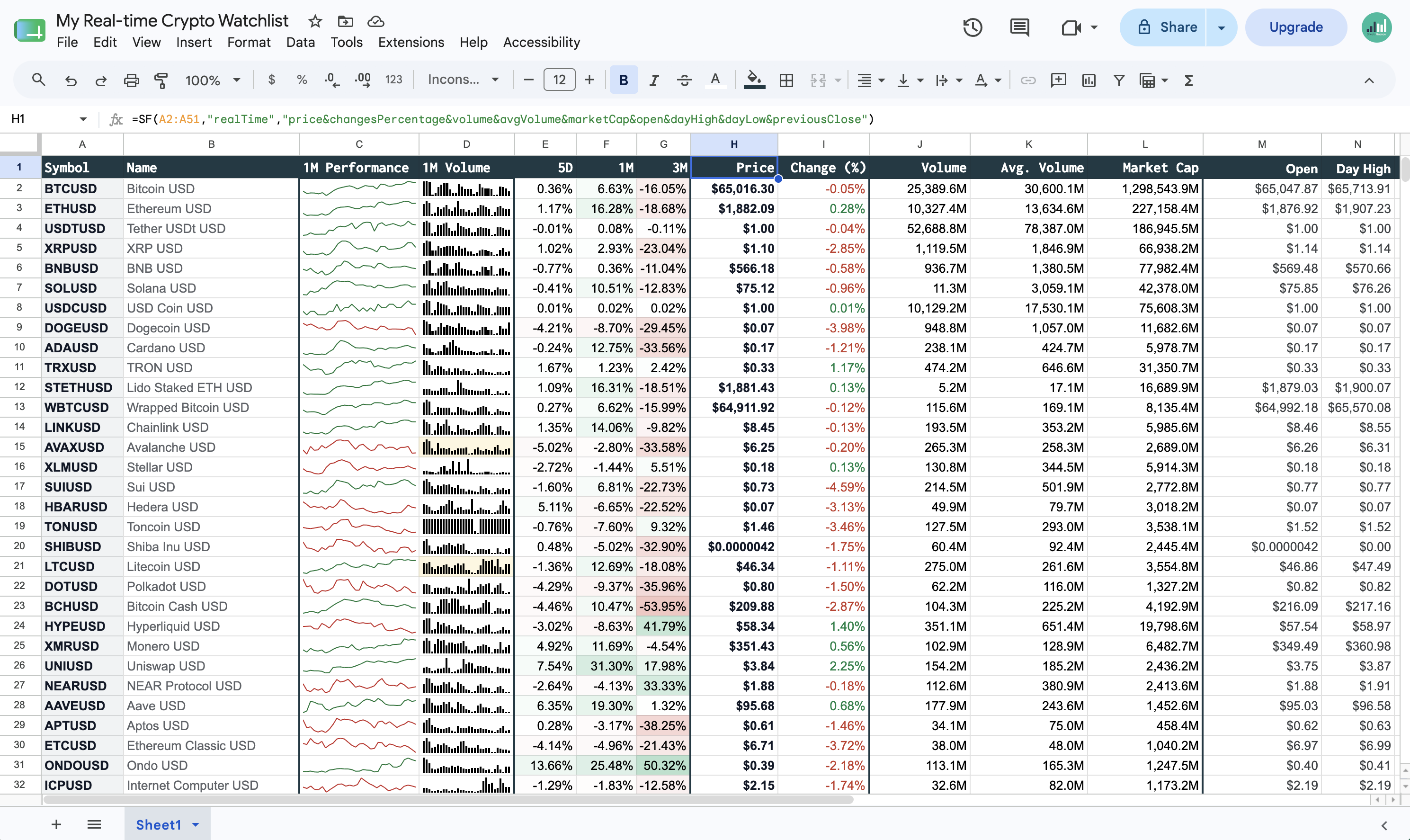
Pull live quotes for an entire crypto watchlist with one batch formula.
 BTC
 ETH
 USDT
 BNB
 USDC
 XRP
 SOL
 TRX
 XMR
 DOGE
 LEO
 ZEC
From prices to watchlist
A live crypto market view in one sheet
Build a watchlist that brings prices, momentum, volume and charts together without copying data between tools.
- Compare live prices and performance across a full crypto watchlist.
- Add sparklines, volume and period changes without maintaining manual imports.
- Track digital assets beside stocks, ETFs and FOREX in the same workbook.
Start your 15-day SheetsFinance trial to use it in Google Sheets and Excel.
What's included
Everything you need to track crypto
From live prices to minute-level history and news — all through simple spreadsheet functions.
- 6,000+
- cryptocurrencies
- 24/7
- market coverage
- 1 min
- smallest interval
- Flexible trading pairs
- Use USD and other quote currencies to pull the pair that fits your analysis.
- Real-time prices
- Live quotes with intraday highs, lows, change and volume as the market moves.
- Minute-level history
- Daily and down-to-the-minute intra-day OHLCV, from 1-minute bars upward.
- Crypto news
- Real-time crypto headlines with sources and timestamps, filtered by symbol or date.
- Watchlists & sparklines
- Build live crypto watchlists and inline sparklines next to your other holdings.
- Alongside everything else
- Track crypto next to your stocks, ETFs and FOREX in one spreadsheet, one function.
Search available cryptocurrencies and pairs in our symbol search. Can't find the altcoin you're after?
Pricing
Crypto data is included in every Market Data plan
Every plan starts with a 15-day free trial. No payment details required.
Testimonials
What our community is saying
“Seems to be the most comprehensive real-time data source and at a reasonable price. Offers more bang for the buck and hopefully no missing data like GoogleFinance().”
“Very intuitive and easy to use app to get financial data, the documentation and guide make it easy to follow. Extremely useful for fetching real time data and a big time saver. Would highly recommend to give it a try.”
“WOW, this is the one. It gets you everything you need. It is normally very hard to get data across so many stock exchanges real time or near real time. A quick review of accessible functions will convince you.”
“SheetFinance is an amazing tool~! I have been using it for several years and am glad to see that it expands the data pool, features, and functions regularly...Adding SheetFinance on Google Spreadsheet made a powerful tool for me in doing analysis for investment and trading. I'm very glad that SheetFinance exists so that I don't have to worry about coding and data processing~!”
“Excellent product. Functionally rich, very powerful and easy to use”
Live demo
Want to build a live crypto watchlist?
Book a 20-minute live demo and we'll build a real-time crypto dashboard with prices, charts and news.
FAQ
Frequently asked questions
Is crypto included in the Market Data plans?
How many cryptocurrencies and trading pairs do you cover?
Are crypto prices available around the clock?
=SF() for a market that trades 24/7, so your watchlists and dashboards are not tied to a stock exchange session. You can return price, percentage change, daily high and low, volume and other useful quote metrics in the same formula.How much crypto price history can I pull?
How granular is the intra-day data?
=SF_TIMESERIES(), alongside 5-minute, 15-minute, 30-minute and hourly intervals. For longer-range analysis, the same function also supports daily time series.Can I pull data for a whole crypto watchlist at once?
=SF() to return live quote metrics or an end-of-day snapshot for a chosen historical date in one batch formula. Basic supports 10 symbols per batch, Investor supports 2,000 and Analyst supports 5,000.Can I calculate technical indicators for crypto?
=SF_TECHNICAL() provides 20+ indicators including SMA, EMA, RSI, MACD and Williams %R. Daily crypto technicals are included on Basic, while Investor and Analyst also support intra-day indicators down to 1-minute periods.Can I get crypto news in my sheet?
=SF_NEWS() returns crypto headlines with their source, publication time and URL, and can be filtered by symbol or date range. Investor supports up to 10 symbols and 20 articles per call; Analyst supports up to 100 symbols and 500 articles.