How to Check ETF Overlap in Google Sheets and Excel
You can check ETF overlap in Google Sheets or Microsoft Excel by pulling each fund's holdings with one SF() formula, matching the tickers, and adding up the smaller of the two weights for every stock the funds share. The result is a single percentage that tells you how much of the two portfolios is effectively the same.
Because the holdings sit in your own spreadsheet, you are not limited to the two-fund comparison most online overlap tools offer. You can compare any pair of covered ETFs, count shared holdings, see which names drive the overlap, and work out how much of one company you really own across several funds.
Start a 15-day free trial of SheetsFinance Market Data (no payment details required) to reproduce every example in this guide. ETF holdings are available from the Investor plan upward, and the Market Data trial includes Analyst-level feature access with a limit of 1,000 data calls per day.
What ETF Overlap Measures
Two ETFs overlap when they hold the same securities. There are three common ways to express it, and they answer different questions:
| Measure | How it is calculated | What it tells you |
|---|---|---|
| Overlap by weight | For every shared holding, take the smaller of its two weights, then sum | The share of both portfolios that is identical. The same answer whichever fund you start from |
| Shared holdings count | Count the securities that appear in both funds | How many names are duplicated, regardless of size |
| Weight in shared names | Sum one fund's weights for the holdings the other fund also owns | How much of one fund is invested in companies the other fund holds. Different for each fund |
Overlap by weight is the figure most people mean. A count on its own can mislead: two funds may share 100 names while one of them holds those names at a fraction of the other's weight.
The ETF Holdings Formula
ETF holdings come from the standard SF() function with the data type set to "etfHoldings":
=SF(symbol, "etfHoldings", metrics, "", options)symbolis the ETF ticker as text or a single cell reference, such as"VOO"orB1.metricscan be blank or"all", or a list joined with&. The full output includesasset(the holding's ticker),name,isin,securityCusip,sharesNumber,weightPercentage, andmarketValue, plus the date the holdings were last updated. The overlap calculation only needsassetandweightPercentage.- The fourth argument is not used for ETF holdings. Leave it as an empty string.
optionscontrols the output."NH"removes the header,"-"reverses the row order, and"limit=20"caps the number of rows returned.
weightPercentage is returned as a decimal fraction, so 0.07 means 7% of the fund. Format the column as a percentage. The same formula works in Google Sheets and Excel.
1. Pull an ETF's Full Holdings
Enter this in A1 of an empty sheet to return every holding of the Vanguard S&P 500 ETF with all available fields:
=SF("VOO","etfHoldings")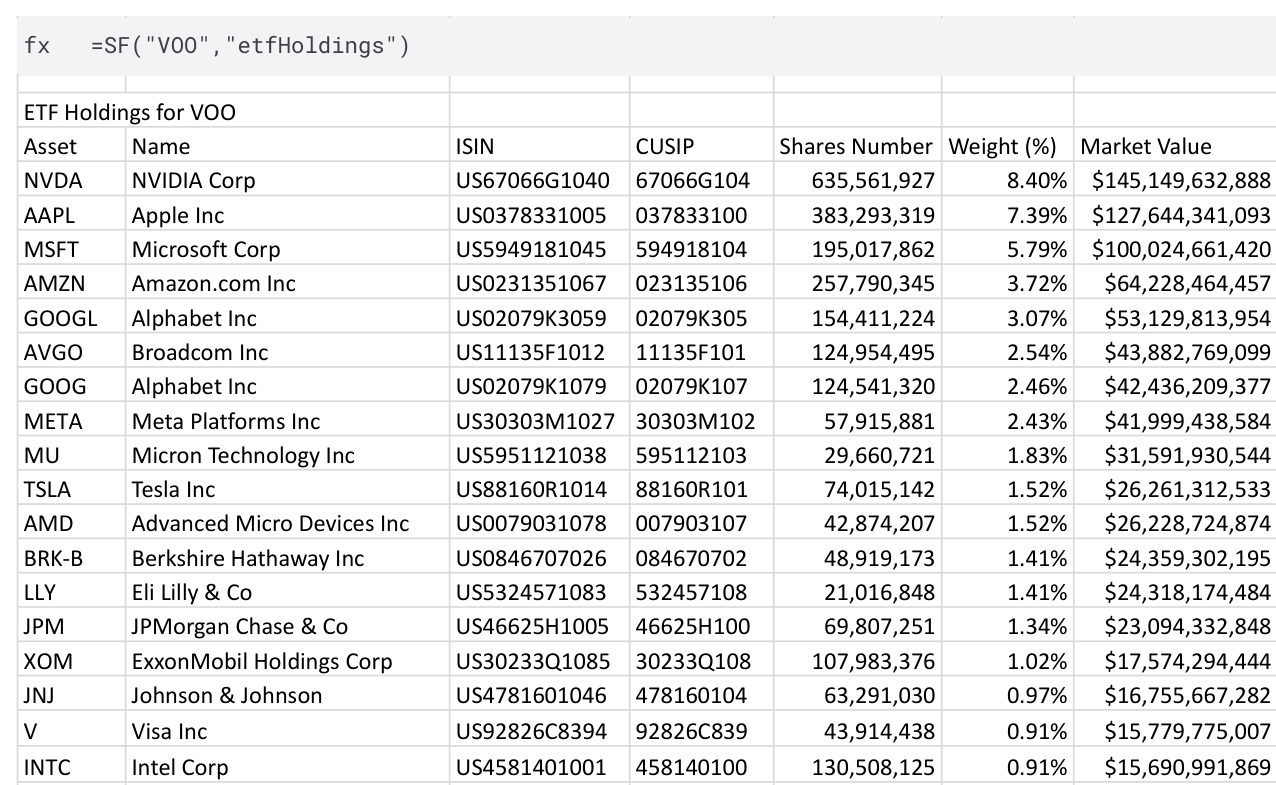
The output starts with a title row ("ETF Holdings for VOO") and a header row, followed by one row per holding. A broad fund returns hundreds or thousands of rows (VOO returned 508 when this guide was written), so clear the area below and to the right first. Otherwise Google Sheets shows #REF! and Excel shows #SPILL!.
For an overlap calculation you only need the ticker and the weight:
=SF("VOO","etfHoldings","asset&weightPercentage")2. Calculate the Overlap Between Two ETFs
This layout compares VOO with QQQ. Swap either ticker and the whole sheet recalculates.
Set up the inputs. Type ETF A in A1 and VOO in B1. Type ETF B in D1 and QQQ in E1. In row 3, add the labels Asset in A3, Weight in B3, Asset in D3, Weight in E3, Weight in ETF B in G3, and Shared weight in H3.
Pull both sets of holdings. The "NH" option removes the header so the first holding lands in row 4 under your own labels. Enter this in A4:
=SF($B$1,"etfHoldings","asset&weightPercentage","","NH")And this in D4:
=SF($E$1,"etfHoldings","asset&weightPercentage","","NH")Match each ETF A holding to ETF B. In G4, look up the same ticker in the second fund and return its weight, or zero when ETF B does not hold it. Fill the formula down to the last ETF A holding (row 511 for VOO's 508 holdings):
=IF(A4="","",XLOOKUP(A4,$D$4:$D$5000,$E$4:$E$5000,0))Take the smaller weight. In H4, enter the following and fill it down beside column G:
=IF(A4="","",MIN(B4,G4))Summarise. Put these labels in J3:J8 and the formulas beside them in column K:
| Cell | Label in column J | Formula in column K |
|---|---|---|
K3 |
Overlap by weight | =SUM(H4:H5000) |
K4 |
Shared holdings | =COUNTIF(G4:G5000,">0") |
K5 |
ETF A holdings | =COUNTA(A4:A5000) |
K6 |
ETF B holdings | =COUNTA(D4:D5000) |
K7 |
ETF A weight in shared names | =SUMIF(G4:G5000,">0",B4:B5000) |
K8 |
ETF B weight in shared names | =SUM(G4:G5000) |
Format columns B, E, G, and H and cells K3, K7, and K8 as percentages.
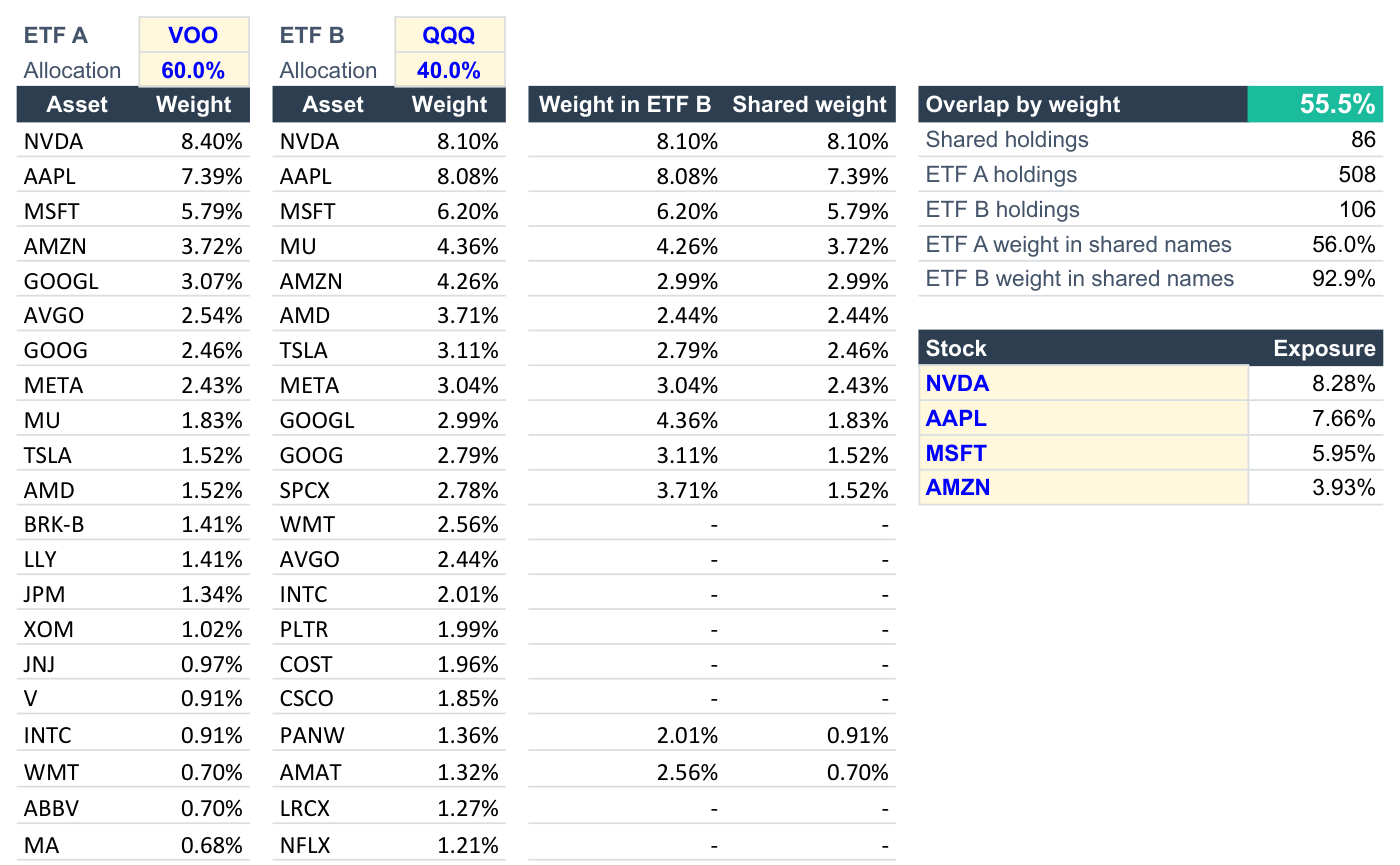
K3 is the headline overlap. When this guide was written in October 2026, VOO held 508 names and QQQ 106, 86 of them appeared in both funds, and the overlap by weight came to 55.5%.
K7 and K8 explain that figure from each side. VOO had 56.0% of its weight in names QQQ also holds, while QQQ had 92.9% of its weight in names VOO holds. That pattern is typical: a broad fund has a modest share of its weight in a concentrated fund's names, while the concentrated fund sits almost entirely inside the broad one.
To see which stocks drive the overlap, sort or filter columns A to H by Shared weight. Copy the range and paste it as values first if you want to sort it in place, because a spilled formula result cannot be reordered directly.
A one-cell shortcut
If you only need the headline figure, you can skip the helper columns once both holdings lists are on the sheet. In Excel:
=SUM(IF(B4:B5000<XLOOKUP(A4:A5000,D4:D5000,E4:E5000,0),B4:B5000,XLOOKUP(A4:A5000,D4:D5000,E4:E5000,0)))In Google Sheets, wrap the same expression in ARRAYFORMULA():
=ARRAYFORMULA(SUM(IF(B4:B5000<XLOOKUP(A4:A5000,D4:D5000,E4:E5000,0),B4:B5000,XLOOKUP(A4:A5000,D4:D5000,E4:E5000,0))))3. See Your Look-Through Exposure to One Stock
Overlap matters most when it concentrates your money in a handful of companies. With the same sheet, you can calculate how much of a single stock you hold through both funds.
Type Allocation in A2 and D2, then enter each fund's share of your portfolio in B2 and E2, for example 60% and 40%. List the tickers you care about from J11 downward, such as NVDA, AAPL, MSFT, and AMZN. In K11, enter this formula and fill it down:
=$B$2*XLOOKUP(J11,$A$4:$A$5000,$B$4:$B$5000,0)+$E$2*XLOOKUP(J11,$D$4:$D$5000,$E$4:$E$5000,0)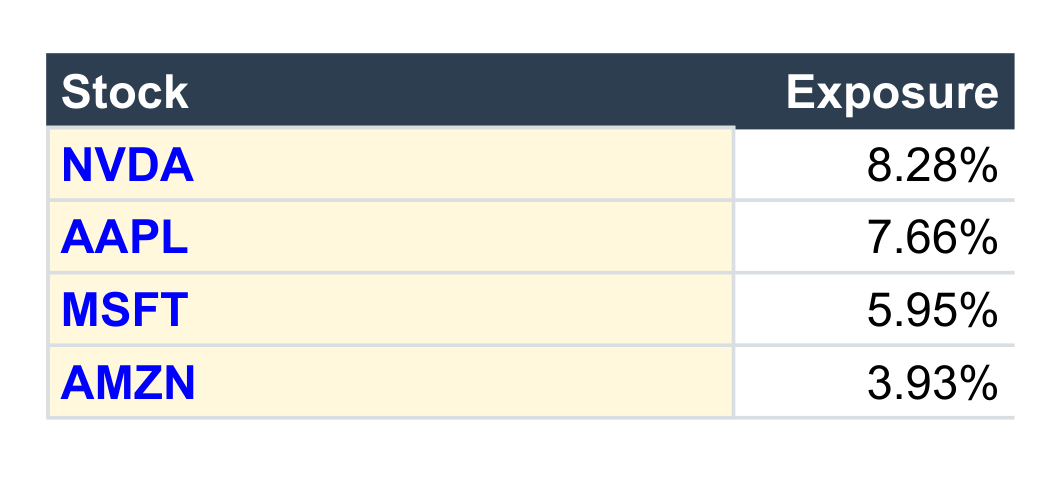
Each result is the stock's combined weight in the two-fund portfolio. Add a third fund by pulling its holdings into another pair of columns and adding one more allocation × XLOOKUP term.
Comparing More Than Two ETFs
The method scales by repetition. Give each fund its own pair of columns with a ticker cell above it, then repeat the lookup and MIN step for each pair you want to compare. For three funds that is three pairs; for four it is six. A small grid with the tickers across the top and down the side, filled with each pair's overlap by weight, makes concentrated combinations obvious at a glance.
For a faster first read, compare sector exposure instead of individual holdings:
=SF("VOO","etfSectors")Two funds with little holdings overlap can still lean on the same sector. The ETF Sectors reference covers that data type, and ETF Info returns fund-level fields such as expense ratio, assets under management, and holdings count for the same comparison sheet.
Common Mistakes to Avoid
- Treating weights as whole percentages:
weightPercentageis a decimal fraction.0.05is 5%, not 0.05%. - Using
limit=in an overlap calculation: A truncated holdings list understates the overlap. Pull the full list for both funds. - Reading a shared-holdings count as overlap: Two funds can share most of their names and still have a low overlap by weight.
- Expecting different share classes to match: Holdings are matched on the
assetticker. Separate listings of the same company, such as two share classes or a local listing and a depositary receipt, count as different holdings. - Ignoring non-equity rows: Cash, futures, and similar positions may appear without a ticker. The formulas above skip blank assets, so a fund's matched weights can sum to slightly less than 100%.
- Leaving data in the spill range: Clear the columns below each holdings formula before entering it.
- Assuming every fund is covered: ETF holdings do not have global coverage; selected major markets are included. If a fund returns no data, check the symbol format with Symbol Search first.
Frequently Asked Questions
What is ETF overlap?
ETF overlap is the portion of two funds invested in the same securities. Measured by weight, it is the sum of the smaller of the two weights for every holding the funds share.
How do I check ETF overlap in Google Sheets?
Pull each fund's holdings with =SF("VOO","etfHoldings","asset&weightPercentage","","NH"), look up each ticker in the other fund with XLOOKUP, take the smaller weight with MIN, and sum the result.
Does this work in Microsoft Excel?
Yes. The SF() syntax is identical in Excel. XLOOKUP requires Excel 2021 or Microsoft 365.
What counts as a high ETF overlap?
There is no universal threshold. Overlap is a description of how similar two portfolios are, not a signal by itself. What matters is whether the combined position sizes match the diversification you intended.
Can I compare an ETF with my own stock portfolio?
Yes. Replace the second holdings formula with your own tickers in column D and portfolio weights in column E. The lookup and summary formulas work unchanged.
Why does a fund return no holdings?
The fund may be outside current holdings coverage or need an exchange suffix. Use Symbol Search to confirm the ticker, and check whether the listing is an ETF with the isEtf field of Company Info.
Start Building Your Own ETF Overlap Checker
Begin with two tickers, confirm the headline overlap, then add the look-through table for the stocks you care about most. Once the sheet is built, changing a ticker in B1 or E1 refreshes the whole comparison.
Review the ETF Holdings function reference, explore the ETF data overview, or start a 15-day Market Data trial to build the workflow in Google Sheets or Excel. To find funds and stocks to analyse next, continue with How to Build a Stock Screener in Google Sheets and Excel.