
Professional financial data, built for Google Sheets

Real-time prices, 30+ years of fundamentals, brokerage sync, options analytics and built-in research tools for 87,000+ global assets โ€” all inside Google Sheets.

Start 15-day free trial

No payment details required

4.6 (250+)
63k+ downloads
Google SheetsMicrosoft Excel
B1
fx
ABCDEF
1PriceChange (%)Day HighDay LowVolume
2AAPL201.45+1.24%203.10198.6648,213,440
3GOOG177.35+0.68%179.12175.8421,406,280
4NVDA172.85-0.36%175.20170.91162,483,920
5TSLA322.05+2.11%326.44314.72105,218,610
6MSFT498.12-0.42%502.08495.2318,764,350
7AMZN225.02+0.57%227.18222.4131,842,760
8META715.20+1.08%721.64704.3314,526,890
9BTCUSD118,420.15+0.91%119,260.40116,805.2232,481,905,440
10ETHUSD3,642.80-0.28%3,711.353,594.1218,305,440,210

Price quotes for 87,000+ assets, right inside Google Sheets.

No syntax to learn โ€” the Function Generator writes these for you โ†’
Bitcoin
Ethereum logo
Euronext logo
HKEX
LSE
NASDAQ
NYSE
TSX
BCBA
BET
BMV
JPX
KRX
MIL
PRA
SIX
SGX
Tadawul

Your sheet, your desk

Build your own terminal. In cells you control.

Five formulas build this desk โ€” and it's your sheet, not ours. Rearrange it, chain metrics, wire it to your own inputs. We deliver the data, you build the desk.

One batch =SF() call pulls live price and change for the whole list.

B1
fx
=SF(A2:A9, "quote", "price&changePercentage")
A
B
C
D
E
F
G
H
I
J
1
2
3
4
5
6
7
8
9
10
11
12
WATCHLIST LIVE
AAPL232.14+0.62%
MSFT512.66+0.84%
NVDA178.36+2.18%
AMZN226.13+1.05%
GOOGL196.20+0.38%
META714.28-0.42%
TSLA317.45-1.36%
LLY802.35+0.51%
+ 87,000+ more symbols
A1:C12
SYMBOL AAPL232.14+0.62% every panel reads this cell
AAPL ยท DAILY ยท 6M 232.14+9.4% ยท 6M
D2:G7
KEY RATIOS ยท TTM
P/E (TTM)30.8
P/B47.2
ROE151.1%
Debt / Equity1.54
FCF yield3.2%
H2:J7
ESTIMATES โ€” AAPL
EPS ยท next FY7.41
EPS ยท following FY8.12
Revenue ยท next FY$416.9B
EPS analysts38
D8:F12
INCOME โ€” AAPL โ€น โ€บ
Revenue$402.1B
Gross profit$187.3B
Operating income$126.4B
Net income$100.5B
EPS (diluted)$6.59
consolidated or as reported
G8:J12
Research Terminal
+

In-built Tools

Never write a formula

The Function Generator builds every SheetsFinance function for you. Pick the data you want, watch the formula assemble itself, and insert it straight into Google Sheets โ€” no syntax to learn.

Also in the sidebar

Stock Screener
โ€”
Filter 87,000+ assets using hundreds of metrics.
Symbol Search
โ€”
Search our entire database of instruments by name or ticker.
Brokerage
โ€”
Manage your connected brokerage accounts and access your holdings.
Template Library
โ€”
Browse all our free templates and start your analysis with a ready-made model.

Your Analysis

Build your own investing dashboard

Forget trawling through financial websites to find exactly what you need โ€” design your own analysis with SheetsFinance directly in Google Sheets.

Fundamental Analysis
Use our historical stock data to track company growth rates and key perfomance ratios, developing your own fundamental analysis.
Dynamic, real-time watchlists
Use our real-time data and sparkline generators to build detailed, global watchlists.
Complex valuation models
Pull in the data you need to build your own DCF, comparables or any other valuation model you can think of.

What's included

Everything you need for research in Google Sheets

From live quotes and three decades of fundamentals to brokerage sync and options analytics โ€” all through native spreadsheet functions.

30+ yrs
of history
1-min
intraday bars
1,000s
of metrics
Real-time prices
Second-accurate quotes on major exchanges including US markets, with real-time to 15-minute data across 60+ global markets.
30+ years of financials
Income statements, balance sheets and cash flows โ€” annual, quarterly and TTM, with fiscal or calendar reporting.
Ratios & metrics
1000s of pre-calculated ratios and metrics including valuation, profitability, growth, efficiency, liquidity and leverage.
OHLCV & technical indicators
30+ years of daily and intra-day pricing data with 20+ technical indicators in any period.
Brokerage sync
Securely connect unlimited brokerage accounts and sync holdings, balances, orders and transactions.
Options analytics
Full OPRA chains with Greeks, IV rank, volatility surfaces and 20+ years of historical chains.
ETFs, crypto & FOREX
Full ETF holdings and breakdowns, plus 6,000+ cryptocurrencies and all major currency pairs.
Analyst coverage
Ratings, upgrades and downgrades, price targets, earnings estimates and consensus data.
News & calendars
Real-time news plus earnings, dividend, split, IPO and economic calendars, straight into your sheet.
Insiders, institutions & ownership
Insider transactions, institutional holdings and ownership data.
Stock Screener
Filter 87,000+ assets using hundreds of metrics and ratios to find new investment opportunities.
Built-in Google Sheets tools
Use the Function Generator, Symbol Search, Stock Screener and template library from the add-on sidebar.

Global reach

Global financial coverage, native to Google Sheets

Work with 87,000+ stocks, ETFs, funds, currencies, cryptocurrencies and exchange-listed assets through one consistent spreadsheet interface.

Americas

6 markets
USA Canada Brazil Mexico Argentina Chile

Europe

20 markets
United Kingdom Germany France Netherlands Switzerland Italy Sweden Denmark Norway Finland Belgium Austria Spain Portugal Ireland Greece Poland Czech Republic Iceland Turkey

Asia-Pacific

12 markets
Japan Hong Kong China India South Korea Taiwan Singapore Australia New Zealand Malaysia Thailand Indonesia

Middle East & Africa

5 markets
Saudi Arabia Israel Qatar UAE South Africa

Beyond equities

Global indices

S&P 500, FTSE, Nikkei...

Exchange-traded bonds

Corporate & government

6,000+ cryptocurrencies

Spot prices & history

All major FOREX pairs

Live cross rates

Commodities

Metals, energy & ags

ETFs & mutual funds

Holdings & exposure

Looking for a specific exchange? See the full list of available markets in our docs โ†’

Spreadsheet Templates

Free spreadsheet templates to get started quickly

Explore our library of free spreadsheet templates created by the SheetsFinance community and find the perfect sheet to kickstart your financial analysis.
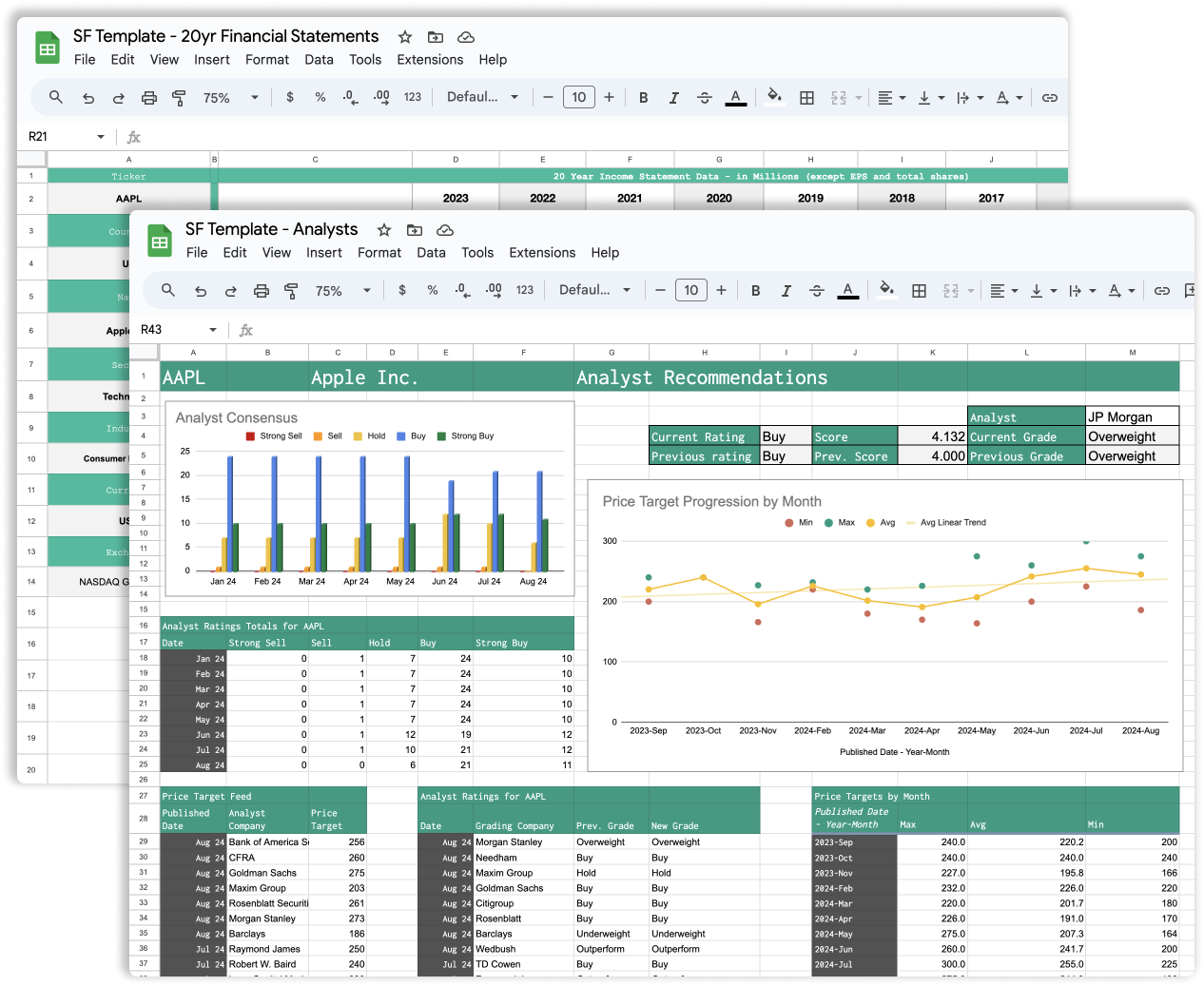
Explore
Search our library of free spreadsheet templates created by the SheetsFinance community.
Download
Once you find the ideal template, make a copy and start using it immediately in Google Sheets.
Contribute
Once you're feeling confident, contribute your own templates to the community.
Templates

Testimonials

What our community is saying

โ€œSheets Finance is an incredibly powerful tool. It pulls data seamlessly from SEC filings, ensuring the data is robust and reliable. The institutional-grade mnemonics make navigating and accessing key data points effortless. What really stands out is its high utility โ€” it saves a ton of time, covers a wide range of stocks, and offers great flexibility with customizable options. For anyone serious about financial analysis, this tool is a game changer. Highly recommendโ€

Romit Fernandes

โ€œVery, very helpful tool. I'm impressed by the consistancy in shape, size, and accuracy of returned data from spreadsheet-driven queries. The creators are also very responsive and helpful if there are any issues.โ€

Mitch Anthamatten

โ€œSheetsFinance is probably the best Excel add-in one can find for markets data. Democratizes access to pro tools with excellent coverage breadth that continues to grow. Customer support is helpful and responsive. Solid documentation too. Lastly, the pace of product improvement in terms of features or new data coverage is excellent. This vastly improves the value one gets out of the subscription. Can't recommend this enough.โ€

ZQ Ong

โ€œGreat! Simple and effective. Going to use this in all of my investing and trading spreadsheets.โ€

Devon Lambert

โ€œGives you all the finance items that google finance doesn't have. At this price, its a steal! If you do any stock analysis using google sheets, Just get it.โ€

Darren Earn

โ€œThis is by far the most impressive tool I've used to do stock analysis as a retail investor. I've spend 100s of hours using dozens of online tools. They all have some sort of benefit, but I've always come back to the idea that it would be much better if I could just access the raw data and then chop it up however I need to to uncover insights about the companies. I finally found a means to do that, and imo it is done in the smartest way possible. Genuinely this is a massive value and an incredibly powerful implementation of what I've been hoping for for so long. Incredible work! Thank you.โ€

Steve Hampton

โ€œOutstandingโ€

Carlos Araujo

Live demo

Want to see SheetsFinance inside Google Sheets?

Book a 20-minute live demo and we'll build a working watchlist or analysis dashboard with you.

Pricing

Plans for every level of analysis

Simple plans for market data, brokerage sync and options - pick what you need, skip what you don't.

  • 15-day free trial on every plan
  • No payment details required
  • Works in Google Sheets & Excel
  • Individual & business licenses
  • Market data ยท Brokerage ยท Options

Each product is its own plan - mix and match. Compare all plans

Begin 15-day free trial

No payment details required

FAQ

Frequently asked questions

How do I install SheetsFinance in Google Sheets?
Install SheetsFinance from the Google Workspace Marketplace. Once installed, open any spreadsheet and find SheetsFinance under the Extensions menu.
How do I connect the add-on to my SheetsFinance account?
Open Extensions > SheetsFinance > Account, copy the Connection ID from your Account Dashboard, then paste it into the add-on. You can install SheetsFinance under any Google account and connect it manually this way. See the Google Sheets setup guide for the full walkthrough.
Can I use SheetsFinance in an existing spreadsheet?
Yes. SheetsFinance functions work in new or existing spreadsheets. Add a function to any empty cell, or use the Function Generator sidebar to build it visually.
Do I need to know the function syntax?
No. Open the Function Generator from the SheetsFinance sidebar, choose the dataset and inputs you need, then insert the generated formula into the selected cell. You can still type or edit functions directly whenever you want.
Do brokerage connections and options data work in Google Sheets?
Yes. Market Data, Brokerage and Options are separate products, but all three work through the same Google Sheets add-on and can be used together in one spreadsheet.
What markets and assets can I research?
SheetsFinance covers 87,000+ assets across 60+ global exchanges, including stocks, ETFs, funds, currencies and cryptocurrencies. Coverage varies by dataset, so check Available Markets for the full exchange list.
Does the data update automatically?
Yes. SheetsFinance functions return live or delayed data according to the market and dataset, and spreadsheet results can refresh without rebuilding your model. Historical and reference datasets update as new source data becomes available.
Is brokerage syncing secure?
Yes. Brokerage connections are read-only: SheetsFinance can retrieve portfolio data but cannot place trades or move funds. In Google Sheets, you also enable brokerage access for each spreadsheet before connected-account data can populate.
Are the spreadsheet templates free?
Yes. The Template Library contains free Google Sheets templates for watchlists, portfolio tracking, fundamental analysis, dividends, technicals and more.
Do I need payment details for the free trial?
No. Your 15-day free trial starts when you install and connect SheetsFinance, with no payment details required.