How to Build a DCF Model in Excel and Google Sheets (Free Template)
A discounted cash flow (DCF) model values a company by projecting the cash its business will generate, discounting that cash back to today at the company's cost of capital, and subtracting what is owed to lenders. You can build one in Excel or Google Sheets with five pieces: historical financial statements, a 10-year free cash flow forecast, a discount rate (WACC), a terminal value, and a bridge from enterprise value to value per share.
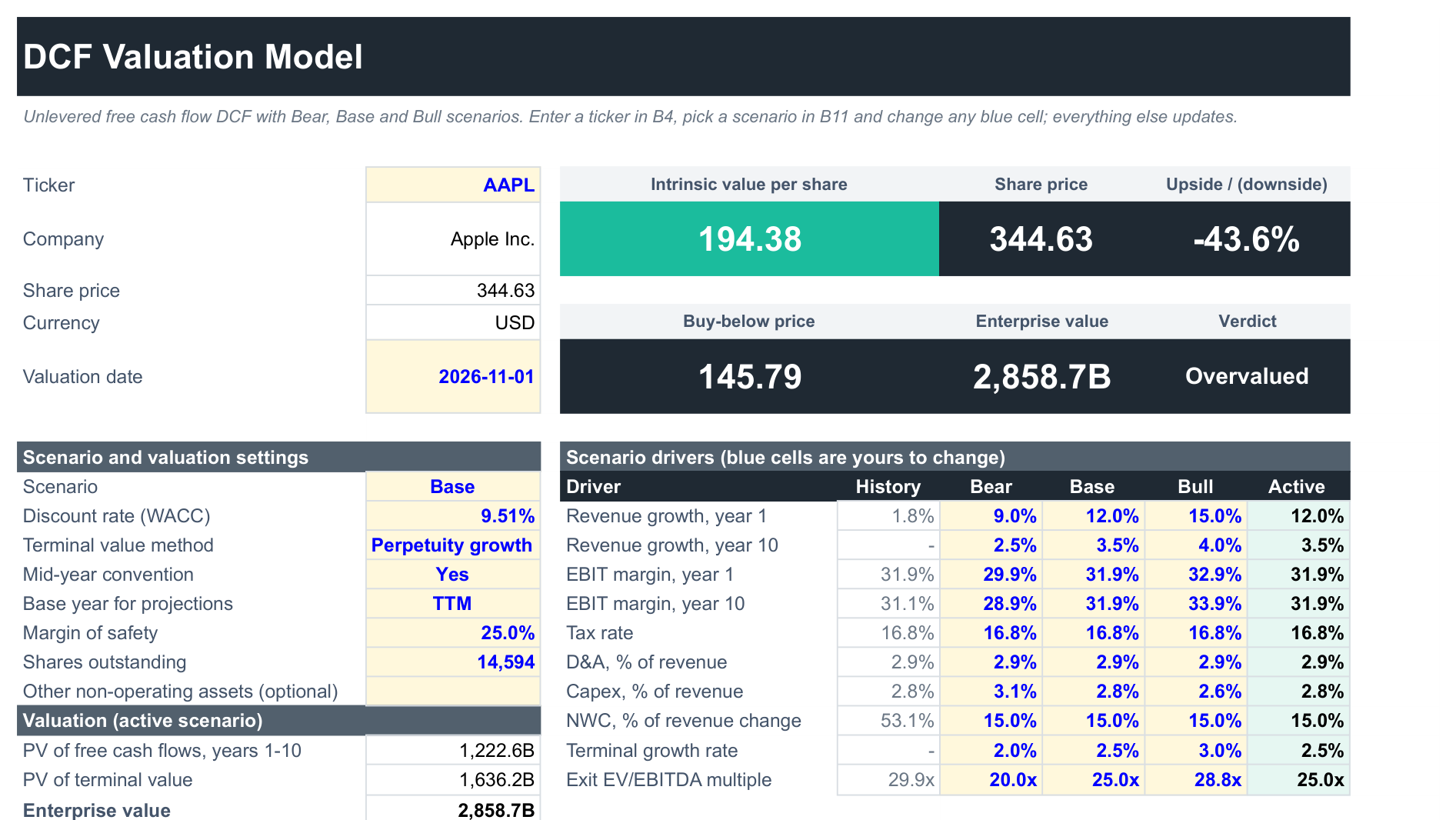
This guide walks through each piece with the formulas that pull the data in automatically, so the model updates when you change the ticker. If you would rather start from a finished model, the free SF DCF Valuation Template is built exactly this way and works in both Google Sheets and Excel. The screenshots below are taken from it, valuing Apple (AAPL) as at 1 November 2026.
Start a 15-day free trial of SheetsFinance Market Data (no payment details required) to reproduce every example in this guide. The trial includes Analyst-level feature access with a limit of 1,000 data calls per day.
What a DCF Model Calculates
A DCF answers one question: what is the business worth today, given the cash it is expected to produce? The steps are the same in every professional model:
- Project unlevered free cash flow (UFCF) for a forecast period, usually 5 to 10 years. Unlevered means the cash available to all investors, before any interest is paid, so debt and equity holders are both covered.
- Discount each year's cash flow at the weighted average cost of capital (WACC), the blended return that debt and equity investors expect.
- Add a terminal value for everything after the forecast period, either by growing the final cash flow forever or by applying an exit multiple.
- Bridge from enterprise value to equity value by subtracting debt and adding cash, then divide by the share count.
The result is an intrinsic value per share you can compare with the market price.
| Term | What it means in the model |
|---|---|
| Unlevered free cash flow | EBIT × (1 − tax rate) + D&A − capex − increase in net working capital |
| WACC | Cost of equity and after-tax cost of debt, weighted by market value |
| Terminal value | Value of all cash flows after year 10 |
| Enterprise value | PV of the forecast cash flows + PV of the terminal value |
| Equity value | Enterprise value − debt + cash − minority interest − preferred stock |
A common mistake is mixing these up: discounting levered free cash flow (after interest) at the WACC and then subtracting debt again counts debt twice. Use unlevered cash flow with WACC, or levered cash flow with the cost of equity, but not a mix.
Step 1: Pull the Historical Financial Statements
Every forecast starts from what the company has actually reported. In the template, a Data sheet pulls five years of income statement and cash flow items with one formula each. Put the ticker in DCF!B4, then enter this in Data!A5:
=SF(DCF!$B$4,"income","date&revenue&ebit&depreciationAndAmortization&incomeBeforeTax&incomeTaxExpense&interestExpense&ebitda","LY-4:LY","pad")"LY-4:LY" means the latest fiscal year with data and the four before it, so the model rolls forward on its own when a new annual report is filed. "pad" keeps a stable five-column shape for companies with shorter histories. The cash flow items go in Data!A16:
=SF(DCF!$B$4,"cashflow","capitalExpenditure&changeInWorkingCapital&depreciationAndAmortization&stockBasedCompensation&freeCashFlow","LY-4:LY","pad")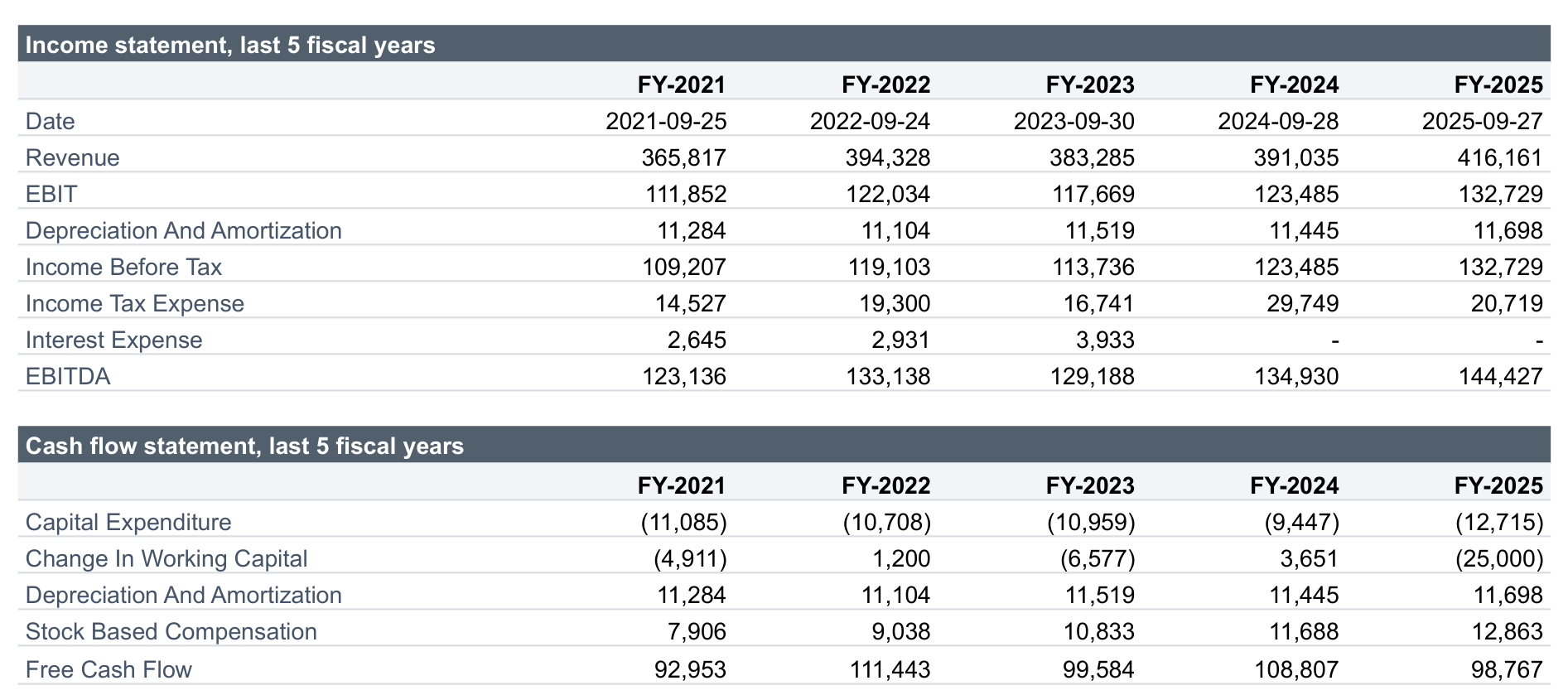
The same formulas with "ttm" as the year return the trailing twelve months, which is the more current starting point mid-year:
=SF(DCF!$B$4,"income","date&revenue&ebit&depreciationAndAmortization&incomeBeforeTax&incomeTaxExpense&interestExpense&ebitda","ttm","")For the bridge to equity value you need the latest balance sheet, and for the year-1 growth rate the analyst consensus:
=SF(DCF!$B$4,"balancesheet","date&totalDebt&cashAndShortTermInvestments&minorityInterest&preferredStock","ttm","")=SF(DCF!$B$4,"estimates","revenueAvg&numAnalystsRevenue","LY+1:LY+2","pad")The share price comes from =SF($B$4,"realTime","price","","NH") and beta, for the cost of equity, from =SF(DCF!$B$4,"companyInfo","beta","","NH"). The formulas are identical in Google Sheets and Excel. Five years of statements and analyst estimates need the Investor plan or higher; the Basic plan covers three years of statements. See the Financial Statements and Analyst Estimates references for every available line item.
Step 2: Set the Forecast Drivers
A DCF is only as good as its assumptions, so keep them few, visible and easy to change. The template drives the whole forecast from ten numbers per scenario:
| Driver | Base case default |
|---|---|
| Revenue growth, year 1 | Analyst consensus for the next fiscal year, else the 3-year CAGR |
| Revenue growth, year 10 | Terminal growth rate + 1 point |
| EBIT margin, years 1 and 10 | Latest fiscal year's EBIT margin |
| Tax rate | 5-year average effective rate (21% if missing or unusual) |
| D&A and capex, % of revenue | 3-year averages |
| Change in NWC, % of revenue change | 4-year total, kept between −15% and 15% |
| Terminal growth rate | 2.5% |
| Exit EV/EBITDA multiple | Current EV/EBITDA, kept between 5x and 25x |
Bear and Base and Bull each get a column, and a selector in DCF!B11 picks which one feeds the model. An Active column uses INDEX and MATCH to pick the right value:
=INDEX(F12:H12,1,IFERROR(MATCH($B$11,$F$11:$H$11,0),2))Two choices make the forecast much more realistic than a single flat growth rate:
- Fade growth and margins. Revenue growth moves in a straight line from the year-1 rate to the year-10 rate, so a fast grower slows down gradually instead of compounding at today's pace for a decade. In the Model sheet, year 1's growth in
Model!I9is=IF(I33<>"",I33,DCF!$I$12+(DCF!$I$13-DCF!$I$12)*(I$6-1)/9), where row 6 holds the projection year number. - Allow per-year overrides. Rows 33 to 36 of the Model sheet are blank input cells for growth, margin, tax and capex. Type a figure for one year (a product launch, a restructuring year) and it replaces the driver for that year only.
Step 3: Project Unlevered Free Cash Flow
With the drivers set, each projection year follows the same chain from revenue to cash:
- Revenue = prior year × (1 + growth)
- EBIT = revenue × EBIT margin
- Taxes on EBIT = −MAX(0, EBIT) × tax rate
- NOPAT = EBIT + taxes on EBIT
- D&A = revenue × D&A %
- Capex = −revenue × capex %
- Change in NWC = −(revenue − prior revenue) × NWC %
- Unlevered FCF = NOPAT + D&A + capex + change in NWC
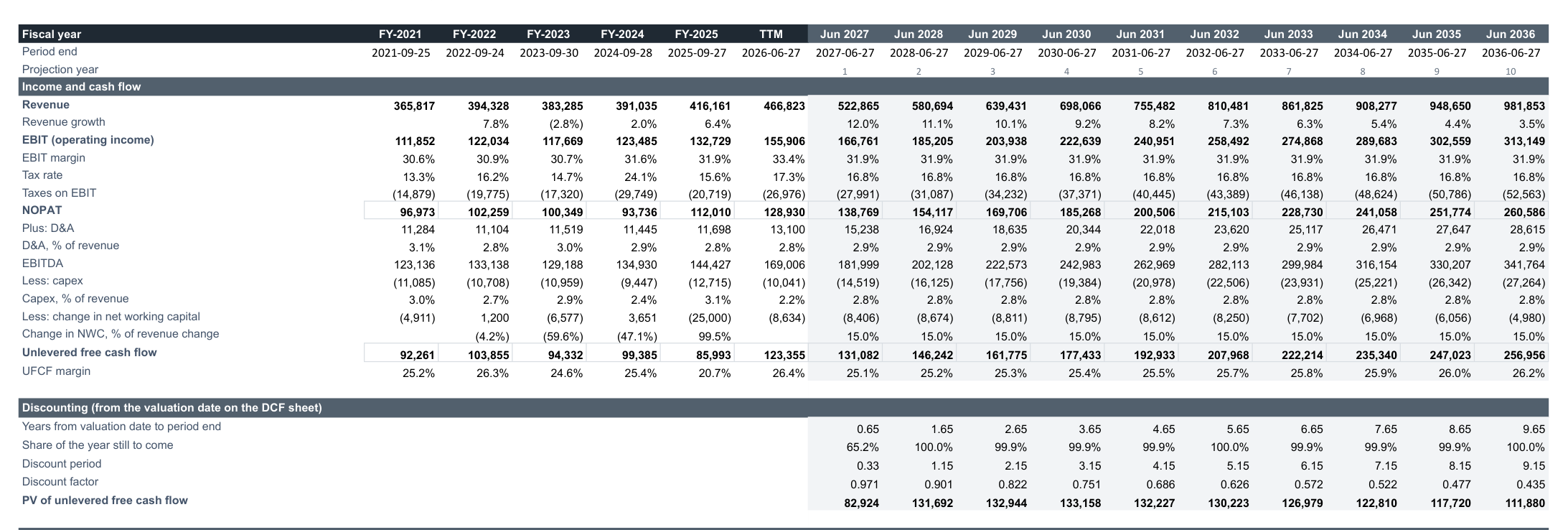
Showing the reported years beside the forecast is the quickest sense check there is. If the forecast margin or capex ratio is far from anything the company has achieved, the assumption needs a reason.
Stock-based compensation is already deducted inside EBIT as an operating expense. The model does not add it back, so dilution is treated as a real cost. Many quick DCFs add it back and overstate value.
Step 4: Discount the Cash Flows Correctly
Discounting looks simple, but the timing details move the answer by several percent:
- Count from the valuation date. Each forecast year ends a whole number of years after the base period, so the template measures the time from the valuation date in
DCF!B8to each period end:=MAX(0,(I5-DCF!$B$8)/365.25). - Use a stub for a part-year. If the first forecast year is already partly over, only the part still to come counts:
=MIN(1,MAX(0,I26)). - Use the mid-year convention. Cash arrives through the year, not on the last day, so each year is discounted from its midpoint:
=IF(DCF!$B$14="Yes",I26-I27/2,I26).
The discount factor is then =1/(1+DCF!$B$12)^I28, and the present value of each year's cash flow is =I22*I27*I29.
Step 5: Calculate the Discount Rate (WACC)
The WACC is the rate the cash flows are discounted at. The template's WACC sheet builds it from live data:
- Cost of equity with CAPM: risk-free rate + beta × equity risk premium.
- Cost of debt: interest expense ÷ total debt, with a fallback when a company does not report interest expense (Apple does not since FY2024), and an override cell for a bond yield.
- Weights from market capitalisation and total debt.
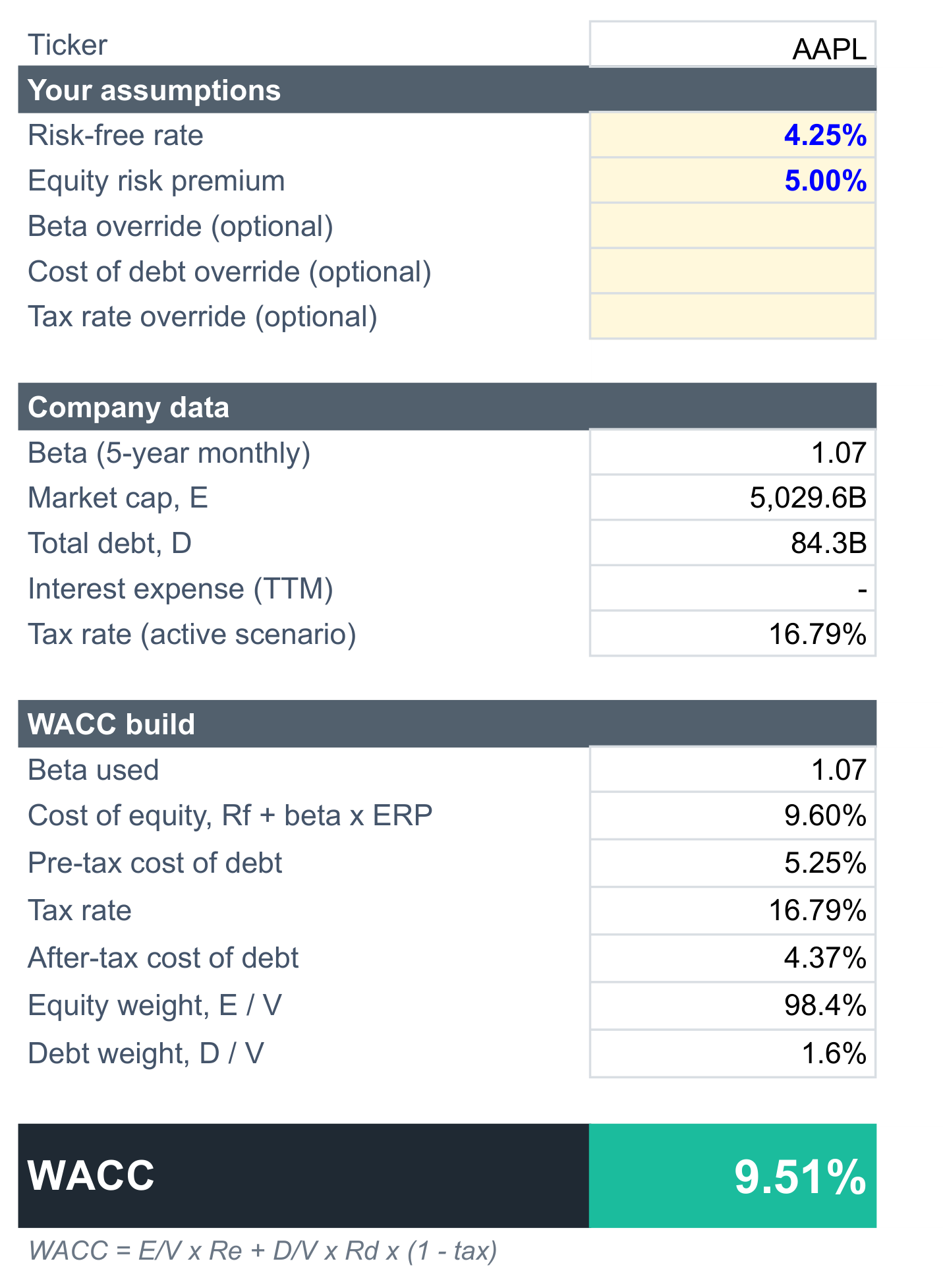
The result feeds DCF!B12, which you can also type over directly. For a closer look at each input, the SF WACC Calculator template adds a sensitivity grid and a five-year history of the implied cost of debt.
Step 6: Add a Terminal Value
A 10-year forecast leaves most of a company's value in the years after year 10, so the terminal value matters. There are two standard methods, and the template lets you pick either or average them in DCF!B13:
- Perpetuity growth (Gordon growth): final-year UFCF × (1 + g) ÷ (WACC − g). In
Model!B42:=IF(B41<=B40,0,B39*(1+B40)/(B41-B40)). Keep g at or below long-run nominal GDP growth, usually 2% to 3%. - Exit multiple: final-year EBITDA × an EV/EBITDA multiple, discounted from the end of year 10.
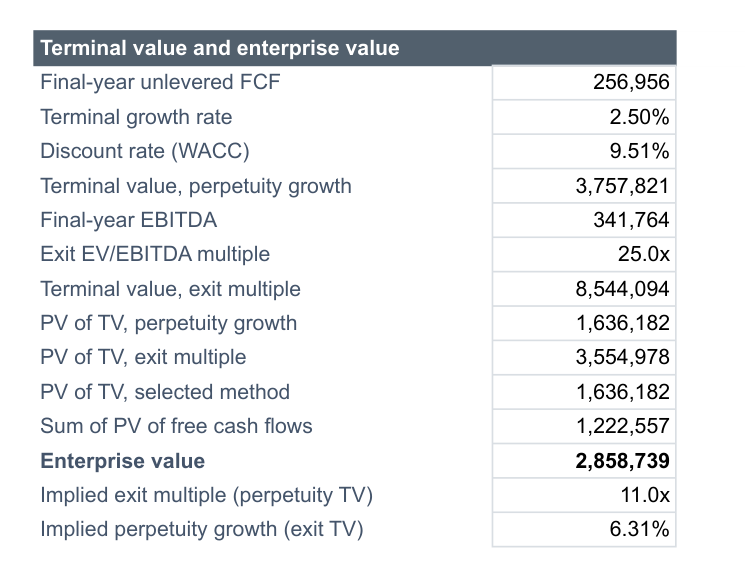
Each method implies something about the other, and checking it is the best defence against an unrealistic terminal value. For Apple, the 2.5% perpetuity growth rate implies an exit multiple of 11.0x EBITDA, while a 25x exit multiple implies the cash flows grow at 6.31% a year forever, well above any economy's long-run growth. When the two disagree that much, the exit multiple is usually the assumption doing too much work.
Step 7: Bridge to Value per Share
Enterprise value is the value of the whole business. To get to what the shares are worth:
- Start with enterprise value = PV of free cash flows + PV of terminal value.
- Subtract total debt, minority interest and preferred stock.
- Add cash and short-term investments. Add long-term investments such as marketable securities separately if the company holds large amounts; the template has an optional cell for them in
DCF!B18. - Divide by shares outstanding for the value per share.
The template then compares the value with the share price for an upside figure, and applies your margin of safety to the whole value for a buy-below price. For Apple in the Base case, the model gives $194.38 per share against a price of $344.63, a 43.6% downside, with the terminal value making up 57.2% of enterprise value.
Step 8: Stress-Test the Result
No single DCF output is "the" value. A sensitivity grid shows how much the answer depends on the two inputs you are least sure of. The template has two: WACC against terminal growth, and WACC against the exit multiple.
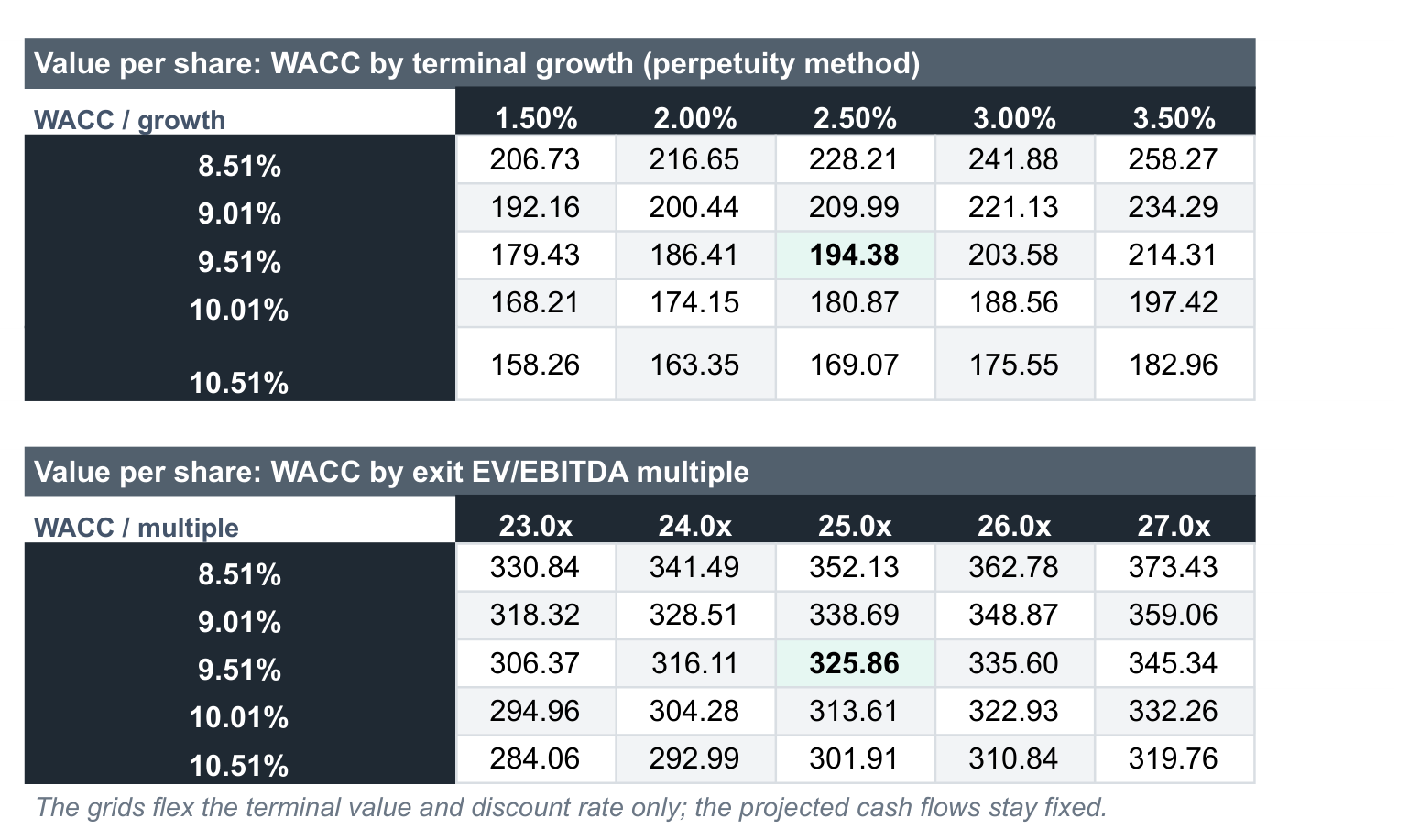
Google Sheets has no Data Table feature like Excel's, so each grid cell recalculates the valuation directly with SUMPRODUCT over the discounted cash flows. That keeps the grids live in both programs:
=SUMPRODUCT(Model!$I$22:$R$22,Model!$I$27:$R$27/(1+$D25)^Model!$I$28:$R$28)Read the grid the way an analyst would: if a half-point change in WACC moves the value more than the gap to the share price, the conclusion depends on the discount rate, not the business.
How to Use the Template in Google Sheets
- Open the SF DCF Valuation Template and click Copy to Google Sheets.
- Open Extensions → SheetsFinance and make sure you're connected.
- Type a ticker into
DCF!B4, for exampleMSFT. - Pick Bear, Base or Bull in
DCF!B11, then adjust the scenario drivers inDCF!F12:H21and the discount rate inDCF!B12.
How to Use the Template in Excel
- On the same template page, click Download for Excel and open the file.
- If Excel asks, trust the SheetsFinance add-in, then connect it from the task pane.
- Type a ticker into
DCF!B4. - Change the scenario in
DCF!B11and the blue driver cells as above. Every formula in this guide works unchanged in Excel.
Common Mistakes to Avoid
- Discounting levered cash flow at WACC. Free cash flow from the cash flow statement is after interest. Rebuild unlevered cash flow from EBIT for a WACC-based DCF.
- Growing at today's rate for ten years. Fade growth toward the long-run rate.
- A terminal value that dominates. If it is more than about 75% of enterprise value, most of the answer comes from one assumption.
- Using last year's annual report mid-year. Once the latest fiscal year is more than a year old, year 1 has already passed. Start from TTM instead.
- Forgetting dilution. Use the diluted share count from the latest quarterly report for a stricter per-share value.
- Applying a DCF to banks and insurers. Their debt is part of operations, so a free cash flow DCF does not fit; use a dividend discount or excess return model.
Frequently Asked Questions
What is a DCF model?
A DCF model values a company as the present value of the cash it is expected to generate. Future cash flows are projected, discounted at a rate that reflects their risk, and added to a terminal value for the years beyond the forecast.
Can I build a DCF model in Google Sheets?
Yes. Google Sheets handles every calculation a DCF needs. The hard part is getting reliable financial statements in; the SheetsFinance add-on pulls them with one SF() formula per statement, so the model updates when you change the ticker.
Is there a free DCF template for Excel?
The SF DCF Valuation Template is free to download for Excel or copy to Google Sheets. It needs the SheetsFinance add-in for live data.
What discount rate should I use in a DCF?
Use the company's WACC for unlevered free cash flow. For large US companies it typically falls between about 7% and 11%, depending mainly on beta and leverage.
Which terminal value method is better?
Perpetuity growth ties the value to fundamentals; an exit multiple ties it to today's market pricing. Professionals usually calculate both and check what each implies about the other.
Why is my DCF value so different from the share price?
The market may expect faster growth, higher margins or a lower discount rate than your model. Use the sensitivity grids to see which assumptions would close the gap, and ask whether they are realistic.
Build Your Own DCF
Copy the SF DCF Valuation Template to start from a finished model, or follow the steps above to build your own. The full statement references are in the docs for the Income Statement, Balance Sheet and Cash Flow. To find companies worth valuing, continue with How to Build a Stock Screener in Google Sheets and Excel, or start a 15-day Market Data trial to build it with live data.