
Ratios TTM Batch
The ratios data type supports batching for TTM (trailing-twelve-month) ratios only. Pass a range of ticker symbols into a single SF call to return TTM ratios for multiple companies at once, with one row per symbol and one column per ratio. The call counts as 1 data call per 10 symbols, rounded up.
Batching limits by plan: Due to the large quantity of data returned, batching for Ratios TTM currently runs under reduced limits: Basic — not available, Investor — 10 symbols, Analyst — 50 symbols, Pro — 500 symbols.
=SF(symbolRange, type, metrics, year, options)symbolRangeis a cell range containing ticker symbols (e.g.,A2:A11).typemust be"ratios"for TTM batching. Annual and quarterly ratios do not support batching across symbols.metricsis the ratio(s) you are after, for example"roe"or"returnOnEquity¤tRatio". Use"all"to return every available TTM ratio. See the full list of available ratios in Key Ratios.yearmust be"ttm"to enable batching. Annual and quarterly year values require one call per symbol.optionsadjusts the formatting of the output. (1)"NH"for no header rows, (2)"NLI"for no line item labels, (3)"-"to reverse the year ordering, (4)"calYear"which adjusts the search to calendar years instead of fiscal years and (5)"pad"which adds padding of empty columns to the output for missing years or quarters. These options can be chained together with the&operator, for example"NH&NLI".
Tips:
Only TTM ratios support batching across symbols. Annual and quarterly ratios require one call per symbol.
When batching TTM ratios, the output shape is automatically swapped: columns represent the ratios and rows represent the symbols.
Chain specific metrics with
&instead of using"all"to keep the output narrow and fast.
Examples
Example 1 - All TTM ratios for a watchlist
=SF(A2:A11, "ratios", "all", "ttm")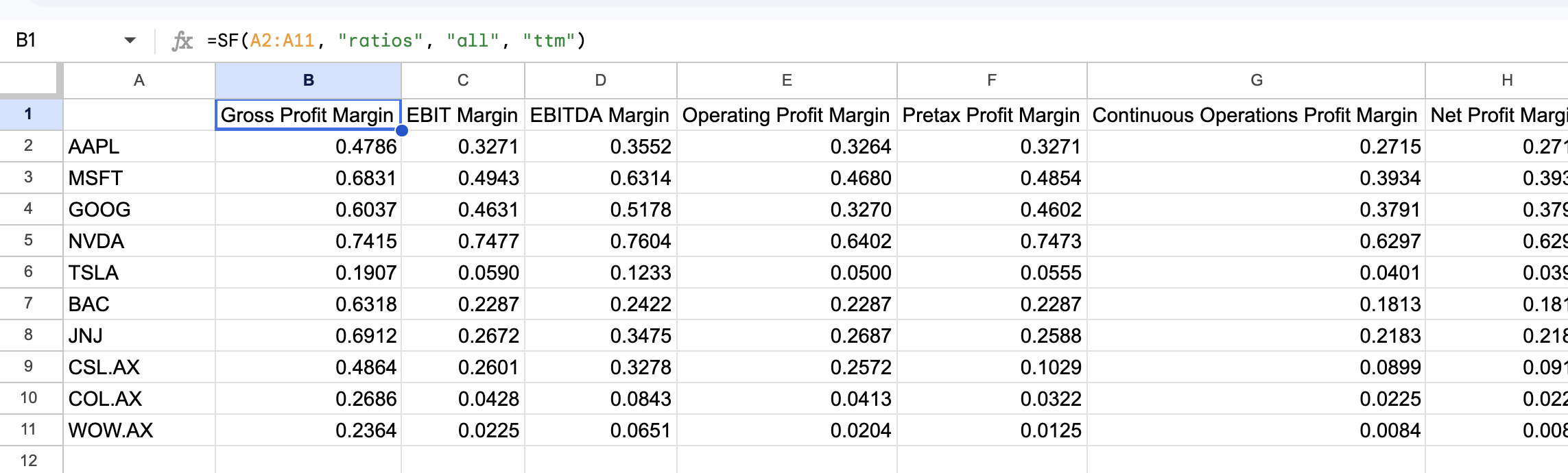
Example 2 - Chained TTM metrics
=SF(A2:A11, "ratios", "returnOnEquity¤tRatio&grossProfitMargin", "ttm")Example 3 - TTM ratios with no headers and no line item labels
=SF(A2:A11, "ratios", "all", "ttm", "NH&NLI")Example 4 - Annual ratio (not batchable, single symbol)
=SF("AAPL", "ratios", "returnOnEquity", "2020")For general batching mechanics and other batchable data types, see Batch symbols to reduce formula calls.