Chains & Contracts
🚨 Important:SF_OPTIONS_PRO() requires an active Options subscription. If you don't have an active subscription, upgrade on our Pricing page.
SF_OPTIONS_PRO() gives you access to full OPRA options chains, contract-level greeks, live and historical chain snapshots, and direct OCC contract lookups. This page covers the chain-style dataType values: "calls", "puts", and "calls&puts".
For a complete function overview, parameter guide, and dataset map, see Options.
For focused historical workflows, see Historical Chains and Contract & Strike Time-series.
=SF_OPTIONS_PRO(symbol, dataType, expirationDate, strike, tradeDate, endDate, metrics, options)symbolis the underlying ticker symbol (for example"AAPL") or a fully specified OCC contract symbol (for example"AAPL251219C00200000").dataTypeselects the chain view:"calls","puts", or"calls&puts". Entering"strikes"also aliases to"calls&puts".expirationDatesets the target expiration date inYYYY-MM-DDformat or as an Excel date serial. If omitted, the function will return the next available expiration date for the underlying symbol.strikeis optional for full chain requests, but required when you want a single contract without using a full OCC contract symbol.tradeDateis optional and requests a historical chain snapshot when supplied. UseYYYY-MM-DDformat, an Excel date serial or Google Sheets date formatted cell.endDateis optional and only applies when you want a historical chain range. It sets the end of the time-series and must be aftertradeDate. UseYYYY-MM-DDformat, an Excel date serial or Google Sheets date formatted cell.metricsselects the fields to return. Leave blank or use"all"to display all available fields, or chain together specific fields with&such as"contractSymbol&strike&mid&impliedVolatility&delta". See the full list of available metrics in the Metrics section below.optionsallows additional output formatting or sorting options. Options can be chained together with&.
Parameters
Symbol (symbol)
Use the underlying ticker symbol for a full chain request, for example "AAPL". You can also pass a fully qualified OCC contract symbol such as "AAPL251219C00200000" when you want one specific contract and want SheetsFinance to infer the option type, expiration date, and strike automatically.
Data Type (dataType)
Use dataType to control how much of the chain you want back:
"calls"returns call-side contracts only."puts"returns put-side contracts only."calls&puts"returns both sides together in one output."strikes"also aliases to"calls&puts".
Expiration Date (expirationDate)
When you are searching by underlying symbol, expirationDate sets the target expiry in YYYY-MM-DD format or as an Excel date serial. You do not need to match the exact listed expiry perfectly because the function will use the date entered or the next upcoming expiration date immediately after it.
Strike (strike)
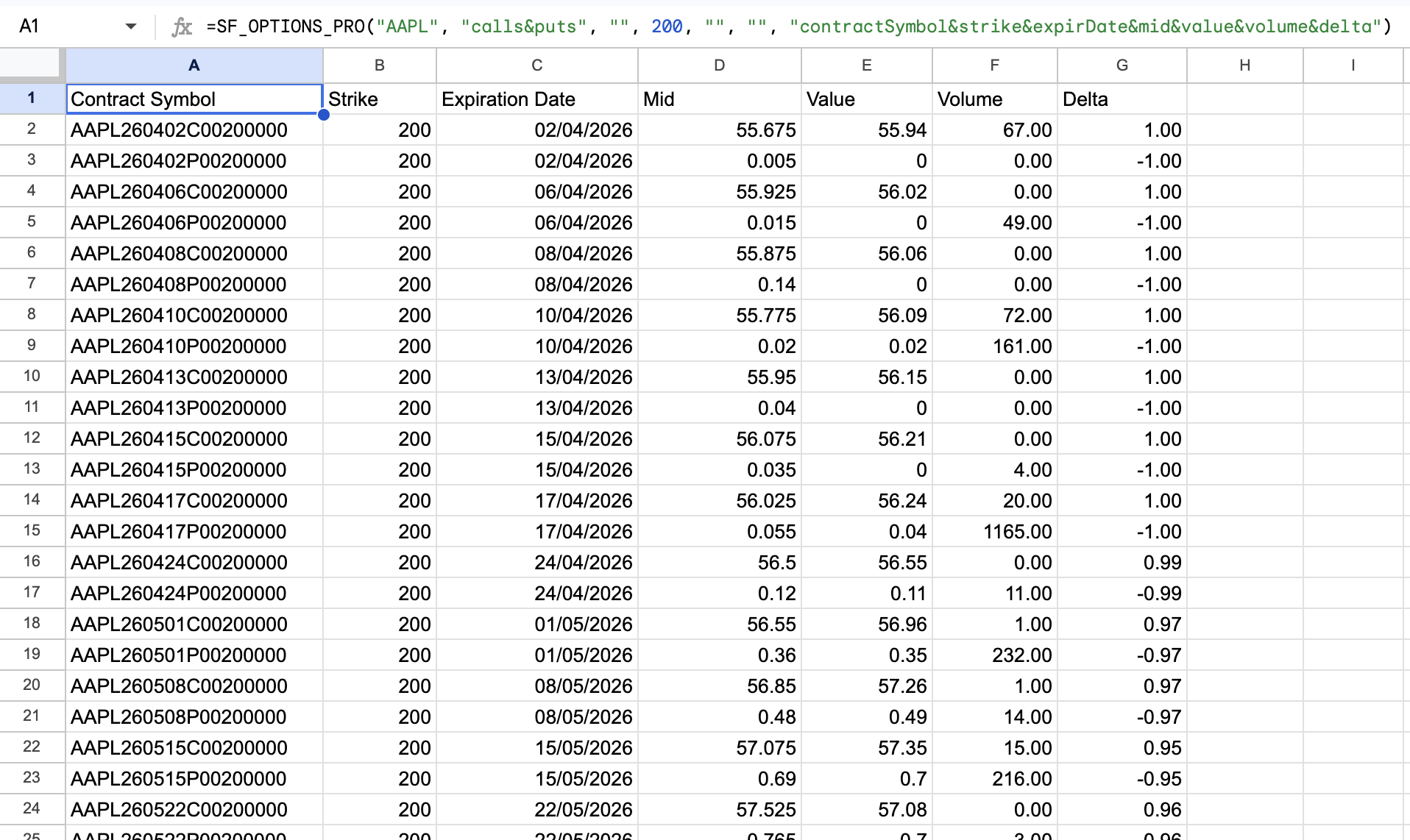
Leave strike blank for a full chain output. If you provide strike together with dataType and expirationDate, the function will return the matching contract for that expiry. If you provide strike but omit expirationDate, the function will return that strike across the available expiration dates for the underlying symbol.
Trade Date (tradeDate)
tradeDate is the historical moment-in-time date for the full chain snapshot, see Historical Chains. If you also supply endDate, it becomes the start date for a historical time-series range, see Contract & Strike Time-series. If you need to discover which expirations were available on a past date first, use "expirationDates" with a tradeDate.
End Date (endDate)
endDate is used to create a historical time-series range when supplied together with tradeDate. It is only applied for a single contract or when both strike and expirationDate are supplied. When used, it sets the end of the historical range and must be after the tradeDate. See Contract & Strike Time-series for more.
Metrics (metrics)
The available chain and contract metrics are:
All (
"all")Contract Symbol (
"contractSymbol")Strike (
"strike")Type (
"type")Value (
"value")Mid (
"mid")Prev Close Value (
"prevClose")Value Change (
"change")Value Percent Change (
"percentChange")Volume (
"volume")Open Interest (
"openInterest")Volume/OI Ratio (
"volumeOIRatio")Bid (
"bidPrice")Bid Size (
"bidSize")Ask (
"askPrice")Ask Size (
"askSize")Implied Volatility (
"impliedVolatility")Delta (
"delta")Gamma (
"gamma")Theta (
"theta")Vega (
"vega")Rho (
"rho")Phi (
"phi")Driftless Theta (
"driftlessTheta")Bid IV (
"bidIv")Ask IV (
"askIv")Ext Value (
"extValue")Residual Rate (
"residualRate")SMV Vol (
"smvVol")Ext SMV Vol (
"extSmvVol")In The Money (
"inTheMoney")Underlying Symbol (
"underlyingSymbol")Stock Price (
"stockPrice")Spot Price (
"spotPrice")Expiration Date (
"expirDate")Expiry Time of Day (
"expiryTod")DTE (
"dte")Trade Date (
"tradeDate")Quote Date (
"quoteDate")Snapshot Date (
"snapShotDate")Snapshot Estimated Time (
"snapShotEstTime")Updated (
"updatedAt")
Options (options)
Use options for output formatting or request modifiers. Chain multiple options together with &.
Formatting options:
"NH"removes the header row."-"reverses the output order.
Value display options:
"changeType=mid"calculates change values using the mid price."changeType=value"calculates change values using the contract value.
Range filters:
"range=ntm""range=20ntm""range=50ntm"
Output grouping:
"groupBy=strike""groupBy=expiration""groupBy=tradeDate"
Examples
Example 1 - All calls and puts for next available expiration with all metrics
=SF_OPTIONS_PRO("AAPL", "calls&puts")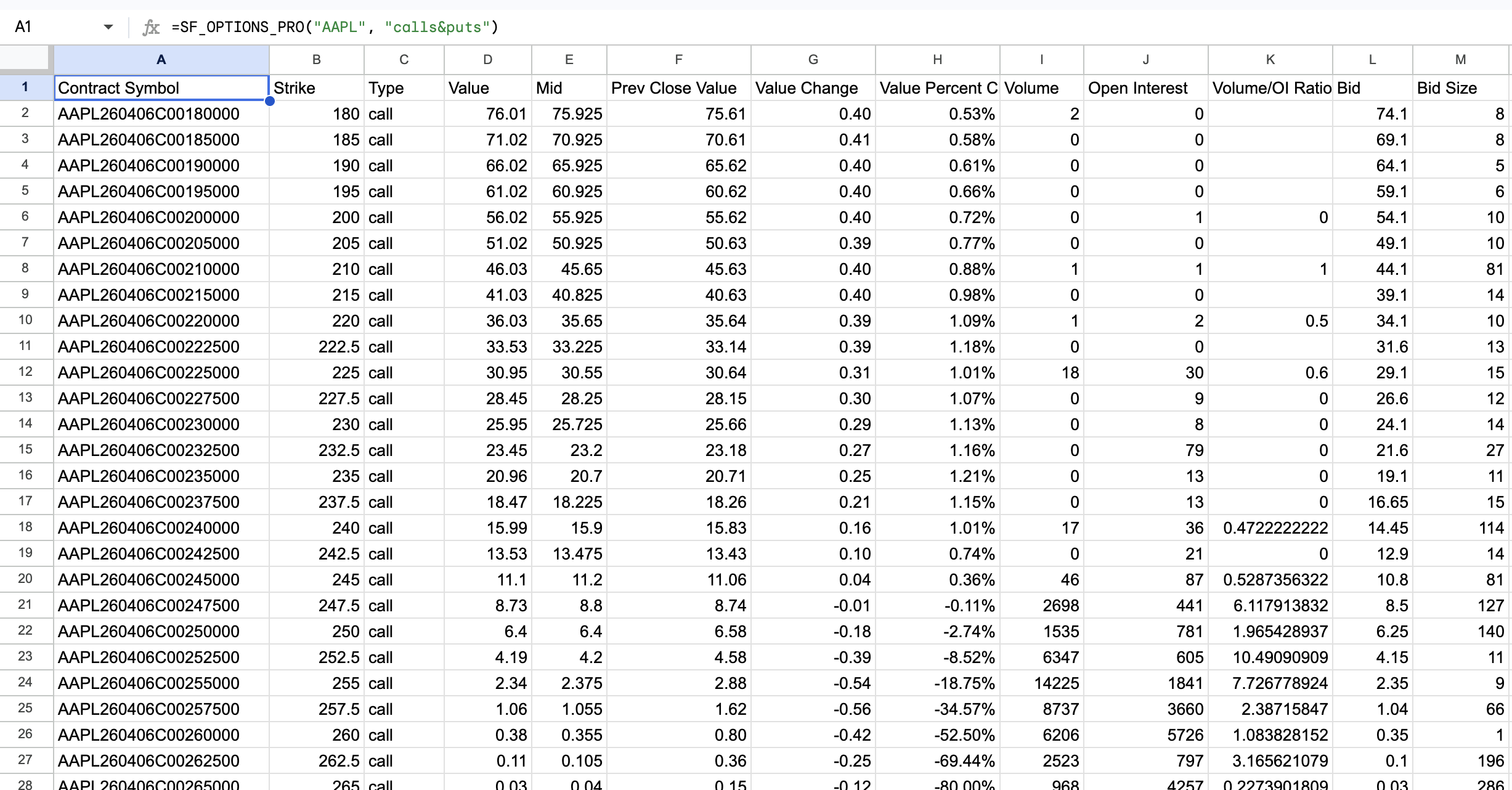
Example 2 - All calls and puts for a specific expiration with select metrics
=SF_OPTIONS_PRO("AAPL", "calls&puts", "2026-10-16", "", "", "", "contractSymbol&strike&mid&impliedVolatility&delta&gamma&theta&vega&rho&phi")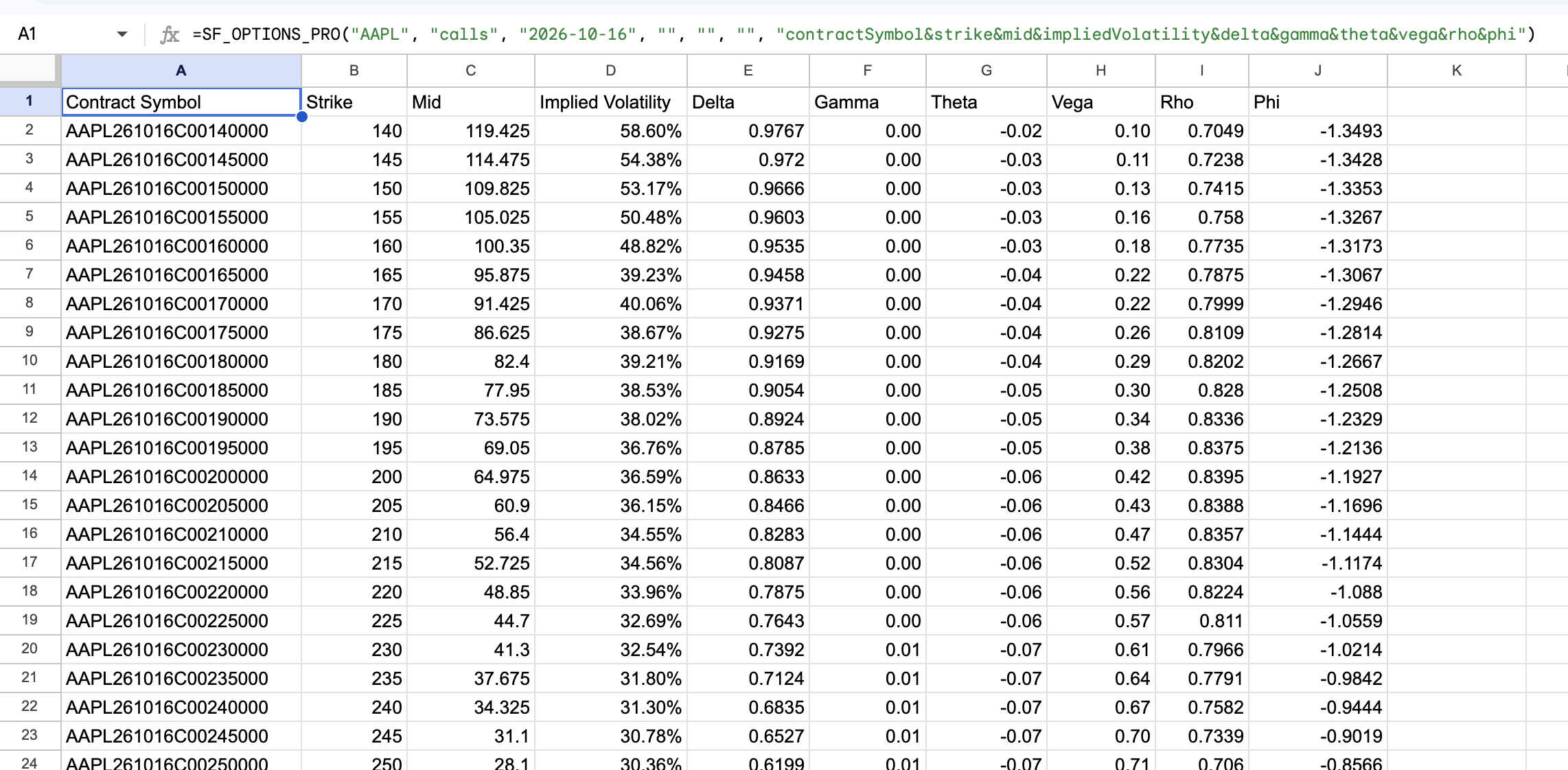
Example 3 - Query a single OCC contract snapshot directly
=SF_OPTIONS_PRO("AAPL261016C00200000")
Example 4 - All calls near the money for a specific expiration with select metrics and no header row
=SF_OPTIONS_PRO("AAPL", "calls", "2026-10-16", "", "", "", "contractSymbol&strike&mid&impliedVolatility&delta", "NH&range=ntm")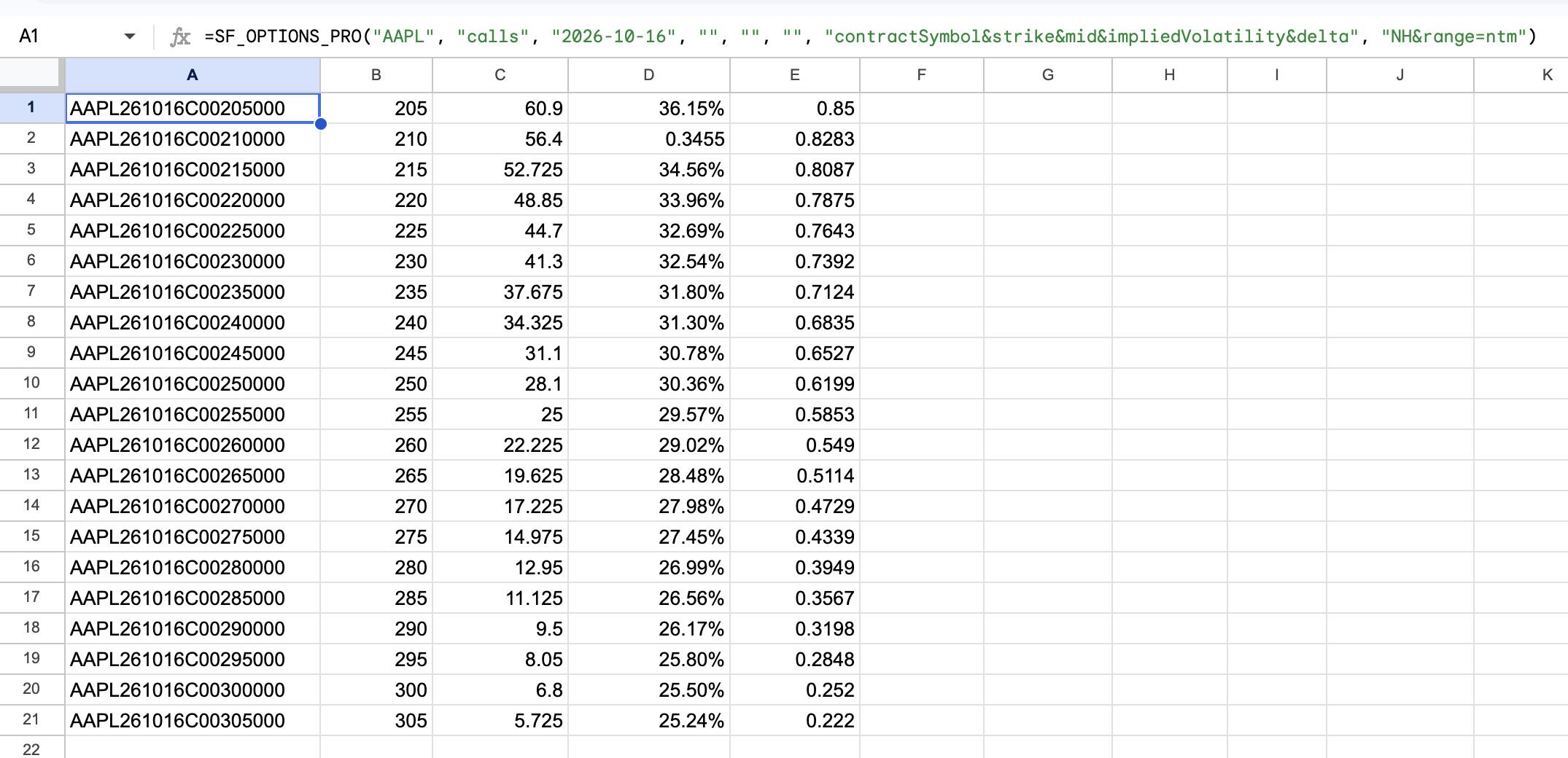
Example 5 - All calls and puts for a specific strike across all expirations with select metrics
=SF_OPTIONS_PRO("AAPL", "calls&puts", "", 200, "", "", "contractSymbol&strike&expirDate&mid&value&volume&delta")