
Options Basic
Generate a snapshot of current chains and contracts with SF_OPTIONS(). You can access the entire calls/puts options chain for a stock with a given expiration date, or you can access a specific options contract directly. The function will output multiple rows and columns of data or just a single cell depending on what is specified.
📈 Options Pro: If you need full OPRA chains with Greeks, 20+ years of historical options data, contract time-series, IV surfaces, earnings analytics, or IV rank data, see the Options Pro docs.
=SF_OPTIONS(symbol/contractSymbol, type, metric, expirationDate, options)symbol/contractSymbolis the either the stock ticker symbol (e.g."AAPL") to generate the entire options chain or the options contract symbol (e.g."AAPL240920C00160000") to directly access data about that specific option. As always, use our Symbol Search to find the correct ticker codes.typeis the type of option, select from:"expirationDates","calls","puts". This field has no effect if acontractSymbolis used.metricselects what metrics to display. Leave blank or use "all" to display all metrics. Chain together metrics with&symbol to display more than one (e.g."contractSymbol&strike").expirationDatesets the expiration date of the options in iso format YYY-MM-DD, e.g."2023-10-23", this will default to the next date after the expiration entered if not exact. This field has no effect if acontractSymbolis used.optionsadjusts the formatting of the output."-"for descending order and"NH"for no header on the output.
type options are:
Expiration Dates (
"expirationDates")Calls (
"calls")Puts (
"puts")
metric options are:
All (
"all")Contract Symbol (
"contractSymbol")Strike (
"strike")Value (
"value")Value Change (
"change")Value Percentage Change (
"percentChange")Volume (
"volume")Open Interest (
"openInterest")Bid (
"bid")Ask (
"ask")Mid (
"mid")Expiration Date (
"expirDate")Implied Volatility (
"impliedVolatility")In the Money (
"inTheMoney")
HOT TIPS:
Leaving
metricblank will default to displaying all metrics, the same as inputting"all".You can chain together metrics to display a subset using the
&character, such as"contractSymbol&strike".Using
"expirationDates"as thetypewill return a list of all expiration dates available for that stock. You can then use this list to navigate all the various options contracts.If you know the contract symbol just type it in directly! Read more in Direct Options Contract Symbols
Expiration Dates
You can generate a list of all options expiration dates by setting the type parameter to "expirationDates". No other function arguments are required. You can then use these expiration dates as a reference for further options analysis of calls or puts. An example is below:
=SF_OPTIONS("AAPL", "expirationDates")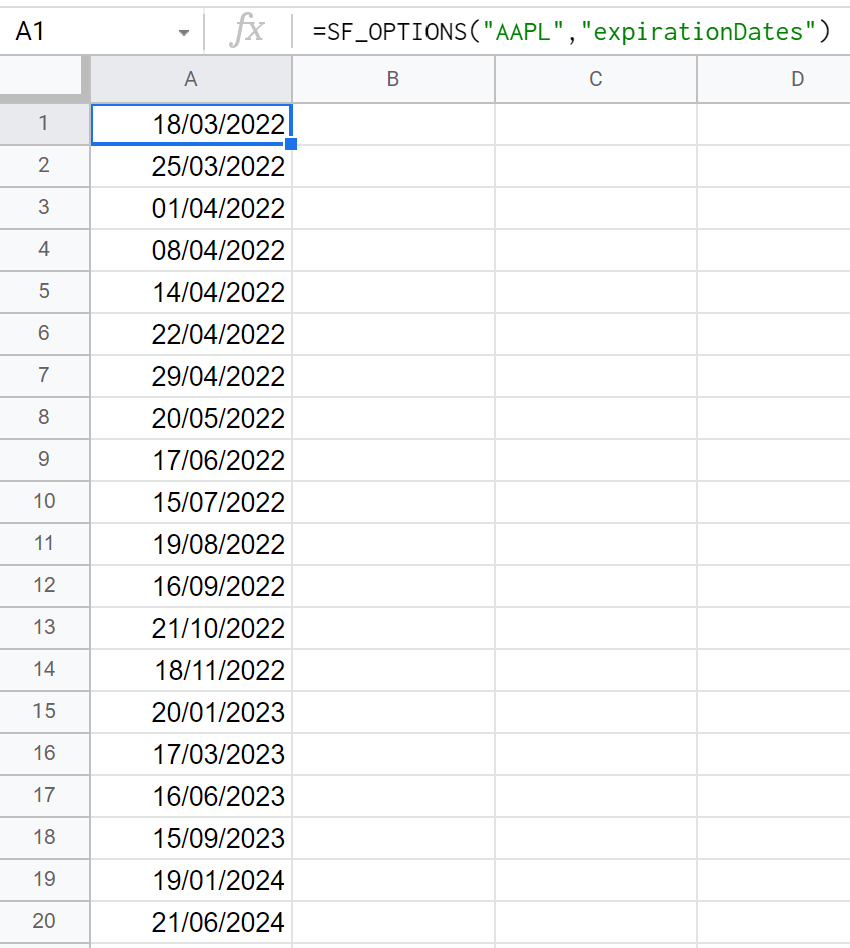
Calls - Option Chain
You can generate calls data for any expiration date by entering "calls" as the type parameter. If you do not select an exact expiration date, the data returned will be for a valid expiration date immediately following the date entered. An example showing all metrics with no data formatting is as follows:
=SF_OPTIONS("AAPL", "calls", "all", "2023-01-20", "")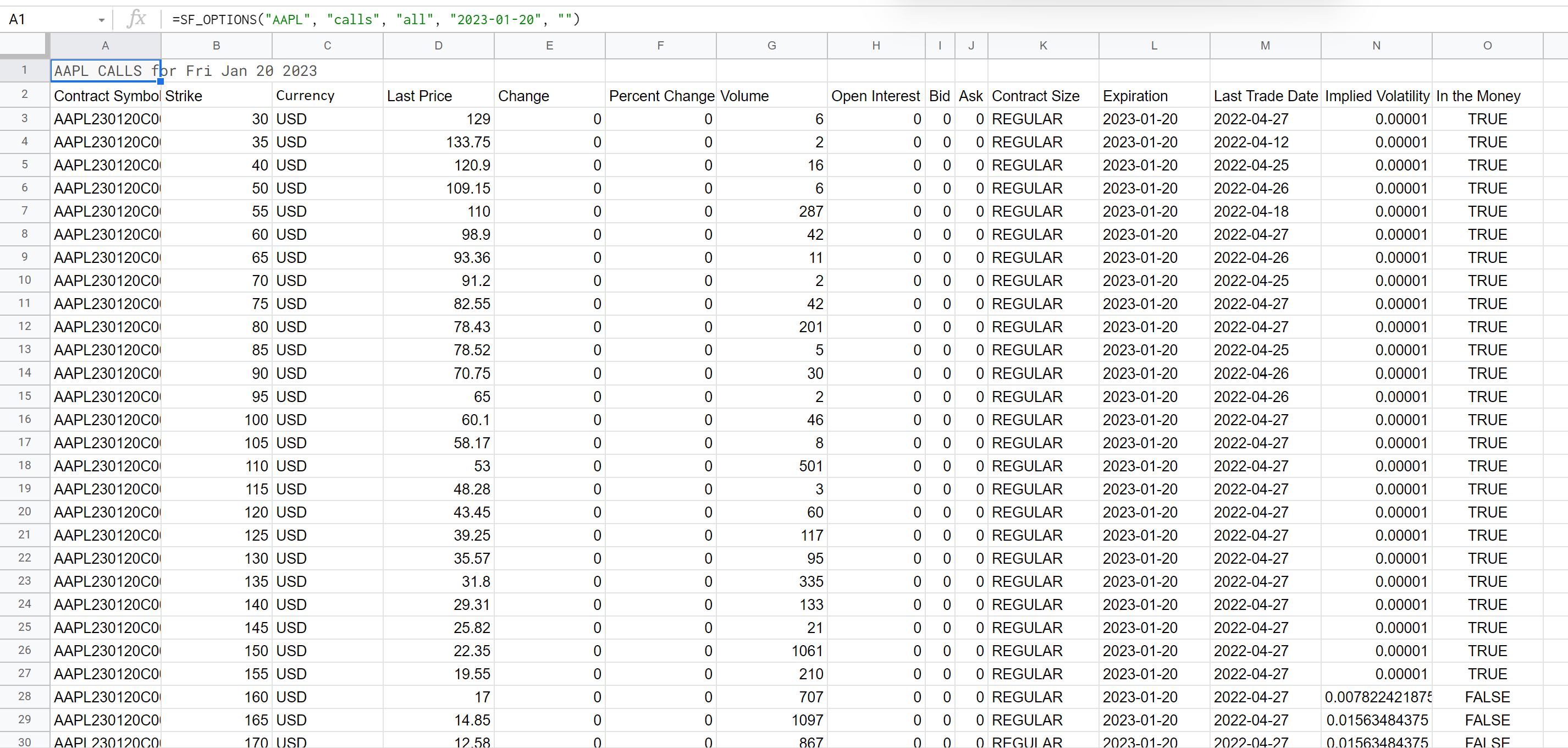
Puts - Options Chain
You can generate puts data for any expiration date by entering "puts" as the type parameter. If you do not select an exact expiration date, the data returned will be for a valid expiration date immediately following the date entered. An example showing all metrics with no data formatting is as follows:
=SF_OPTIONS("AAPL", "puts", "all", "2023-01-20", "")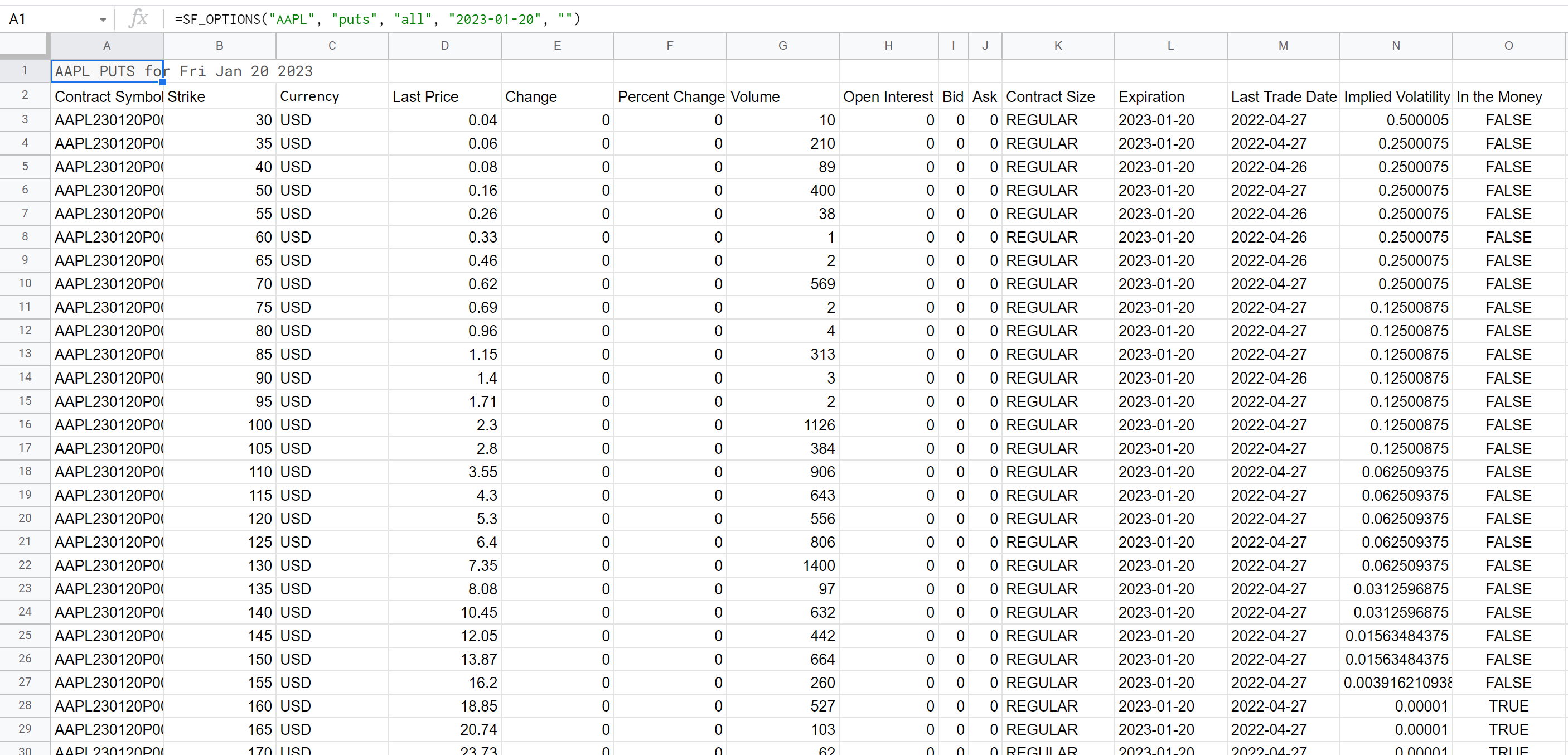
Chaining metrics
You can select what metrics you'd like displayed by chaining them together with the & character. If you would like to display all metrics just leave the metrics parameter blank ("") or enter "all". Otherwise you can enter any combination of the available metrics. Example below:
=SF_OPTIONS("AAPL", "calls", "contractSymbol&strike", "2023-01-20", "")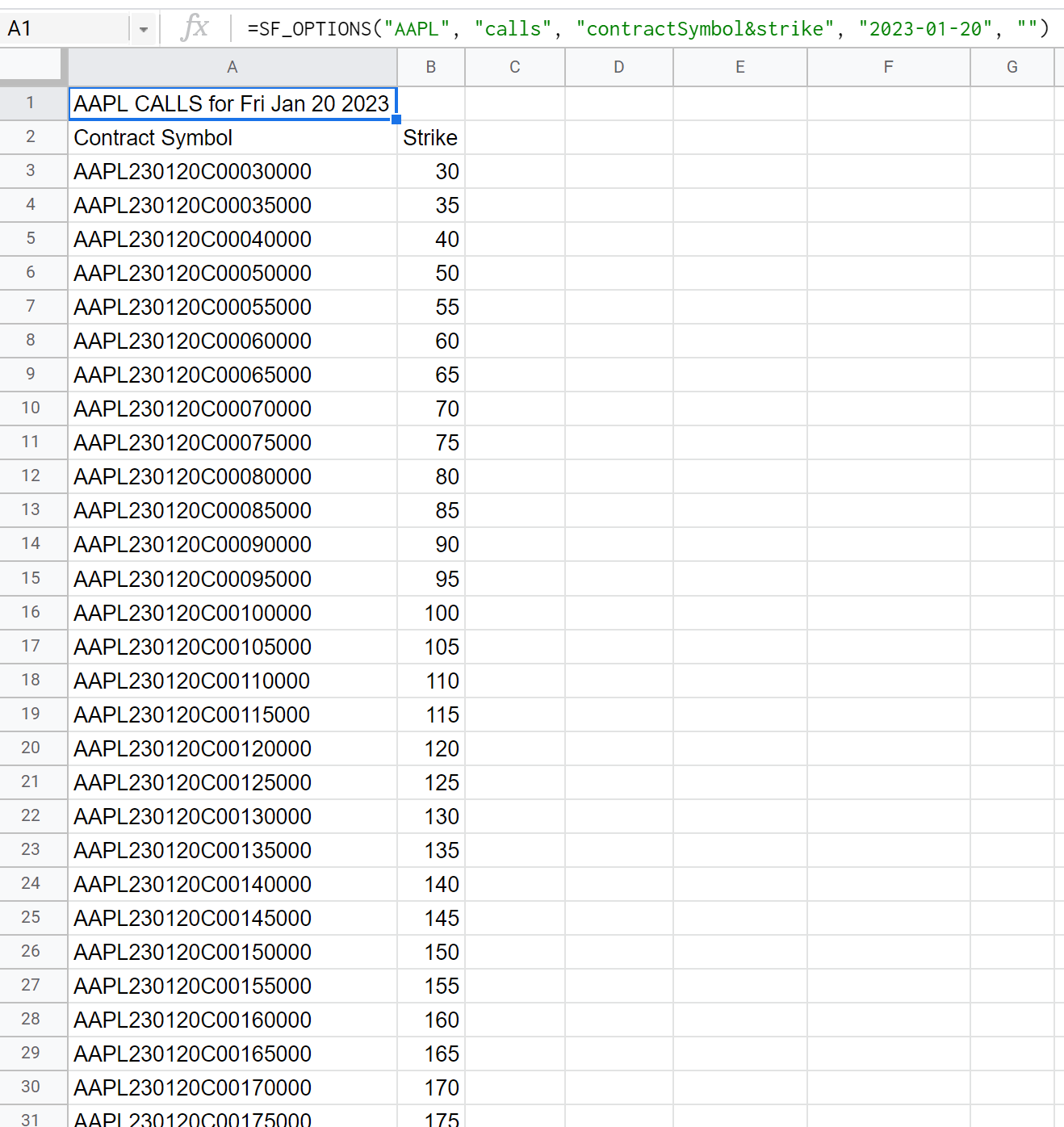
Formatting the output
You can format the data output by either removing the header or changing the order from ascending to descending using the options paramter. Enter "NH" to remove the header from the output and "-" for switching between ascending and descending. These can be included together like so "-NH". An example of removing the header is below:
=SF_OPTIONS("AAPL", "calls", "contractSymbol&strike&value", "2023-01-20", "NH")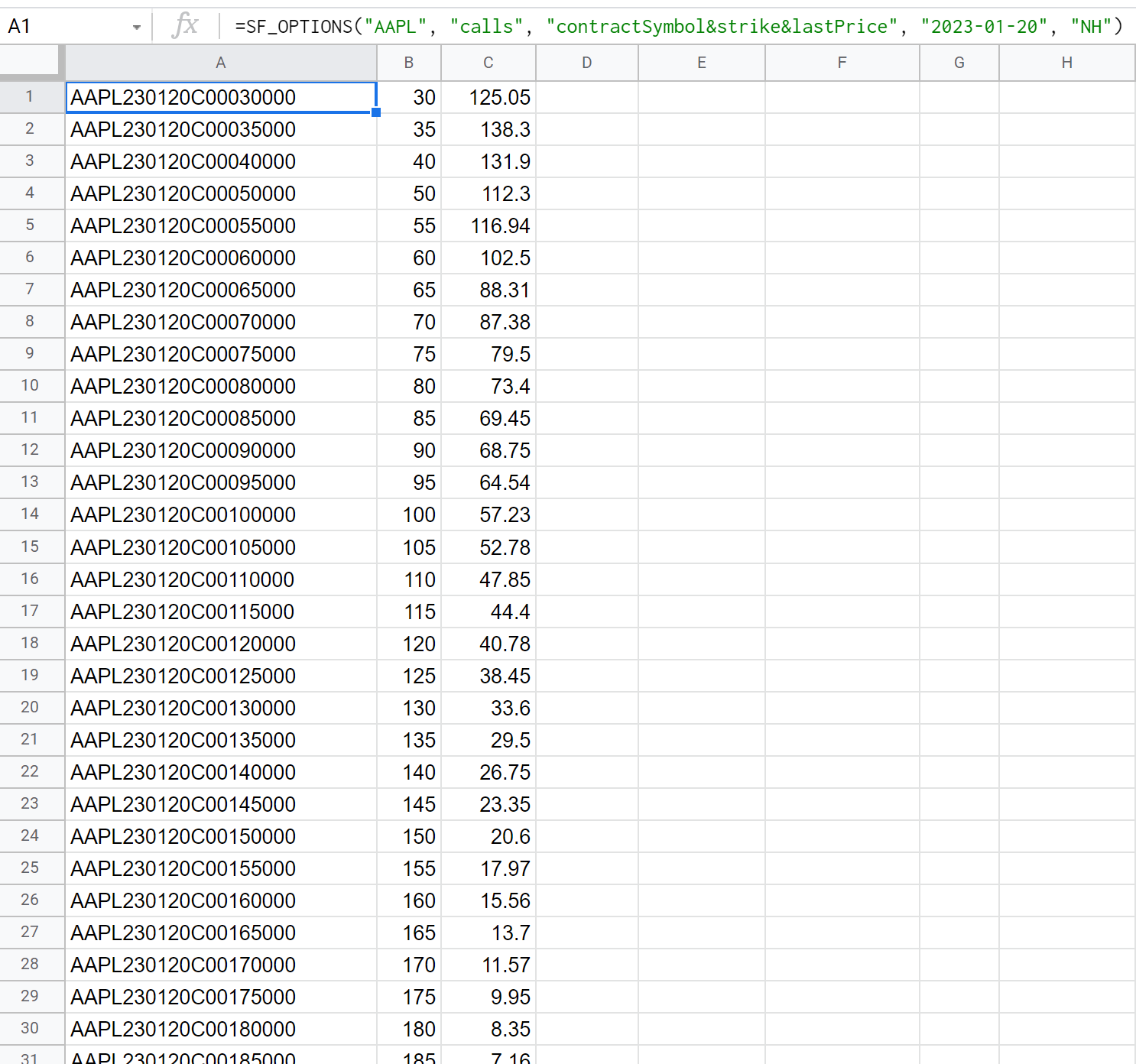
Direct Options Contract Symbols
You can directly access a particular options contract by inputting the contractSymbol directly rather than just the stock ticker code. If you do this the type and expirationDate arguments are no longer used as both are specified by the contractSymbol. You can access a single options contract like so:
=SF_OPTIONS("AAPL240920C00160000")
If you would like to only return a particular metric such as the value you can do the following:
=SF_OPTIONS("AAPL240920C00160000", "", "value ", "", "NH")
Note in this example that both the type and expirationDate parameters are left out of the function by just including and empty string (""). "NH" has also been included here as a final argument to remove the header rows from the output.
You can ofcourse display any number of metrics of the direct options contract by chaining, just the same as the above examples:
=SF_OPTIONS("AAPL240920C00160000", "", "strike&value ", "")