
Pre/Post Market
🇺🇸 Important: Pre/Post market data is only available for US markets.
The prePostMarket function allows you to access the latest data on pre-market and post-market movements for US-based assets. A series of examples are provided below.
=SF(symbol, "prePostMarket", metrics, "", options)symbolis the ticker symbol of the financial asset (e.g.,"AAPL"). You can use our Symbol Search to find the correct ticker symbol.metricsis the specific data you're after for example"ask"or"ask&bid×tamp". You can leave this blank or set it to"all"to output ALL available data. You can also chain together multiple ratios using the&operator, for example"ask&bid". See the list of available metrics below.optionsadjusts the formatting of the output. There is only one available option forprePostMarket. Set this field to"NH"for no header rows.
The prePostMarket data type has the following metrics to select from:
Ask (
"ask")Bid (
"bid")Ask Size (
"askSize")Bid Size (
"bidSize")Volume (
"volume")Timestamp (
"timestamp")
Real-time data, refreshed on demand: Pre/Post Market returns real-time data. Run Refresh Real-time from the SheetsFinance menu to reload your pre/post formulas and pull the latest values from the data service; Refresh All reloads every SheetsFinance formula in the sheet instead.
Examples
Example 1 - All metrics
=SF("AAPL", "prePostMarket")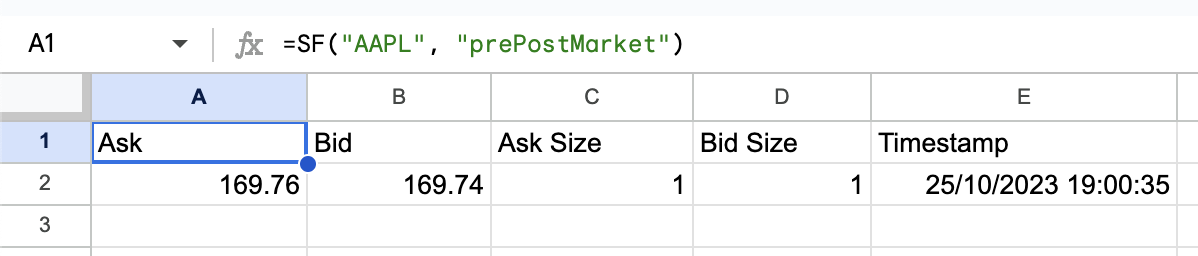
Example 2 - Specific metrics
=SF("AAPL", "prePostMarket", "ask&bid×tamp")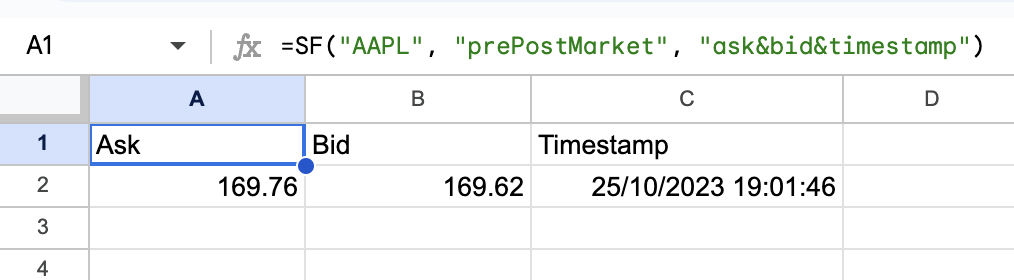
Example 3 - Specific metrics and no header row
=SF("AAPL", "prePostMarket", "ask&bid×tamp", "", "NH")
Example 4 - Single Metric
=SF("AAPL", "prePostMarket", "ask")

169.76